Getting Started - Business Objects
Business Objects
One of the core concepts of CaseMaster is a strict separatation of 'data' from 'action'. CaseMaster development can be summarized as:
- Describe your data
- Define what you want to do with your data
With data we mean your business data such as clients, orders, invoices, suppliers, deliveries, bookings, etc. In data modelling these are often referred to as entities. In CaseMaster we also us the term entities although you also often hear the term business objects.
Each entity (or business object) has attributes (sometimes referred to as properties). Compare these to columns in a spreadsheet or columns in a database table.
The client entity could, for example, have the following attributes:
- Title
- Initials
- Surname
- Address
- Telephone
- ...
A complex CaseMaster system can have dozens of entities and complex entities can have dozens of attributes.
Note: In CaseMaster, there is a technical reason to refer to an entity or a business object or an attribute or a property.
Self Describing Business objects
In CaseMaster you define entities using a strict format. This format describes an entity in great detail. We say that an entity is 'self describing' (hence the term self describing business objects or descriptor in short). We capture all these details in a descriptor to answer question such as:
- Is the surname of the client mandatory or optional?
- What is the label on the screen for the surname field?
- What is the label on the screen for German users?
- And for French users?
- What is maximum number of characters that we allow for the postcode?
- What are the options for the gender field?
- Can you enter a date in the future as the date of birth?
- What is the format of the National Insurance number?
- ...
Business Object Savvy Modules
We touched on business objects (a.k.a. entities...). Another key component of CaseMaster is a large library of BO Savvy Components.
An example of such a component is the list. Lists are everywhere in (database) system: list of clients, list of orders, lists of transactions, etc. The only difference between one and the other lists is what is being listed.
The list is a standard CaseMaster component and what we list is a business object.
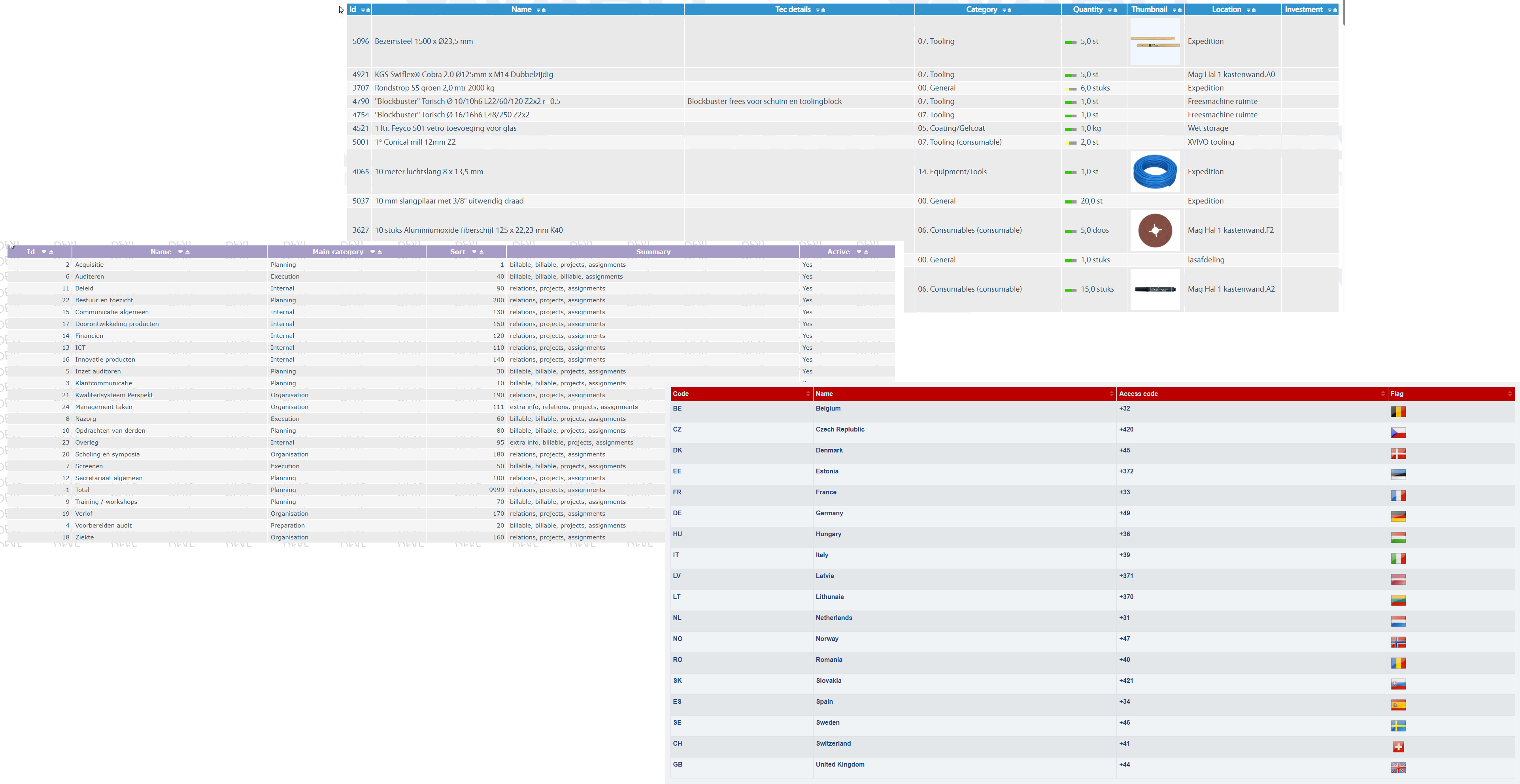
Over the years, thousands of different business object have been created in CaseMaster.
There is however only one list component in CaseMaster. Used thousands of times every day in all the CaseMaster systems used around the world. Used to list thousands of different business objects.
Other examples of BO savvy modules are:
- Calendar
- Form
- Grid
- ...
The separation of what and what with means that you can develop highly generic and reusable code in CaseMaster. For example, the same invoice module may be shared by two CaseMaster customers but the underlying business objects may vary (slightly or drastically) making the invoice module a perfect fit for two customers with different business needs.
Let's Dive In
The following is an example of a BO descriptor for the entity client of an example system
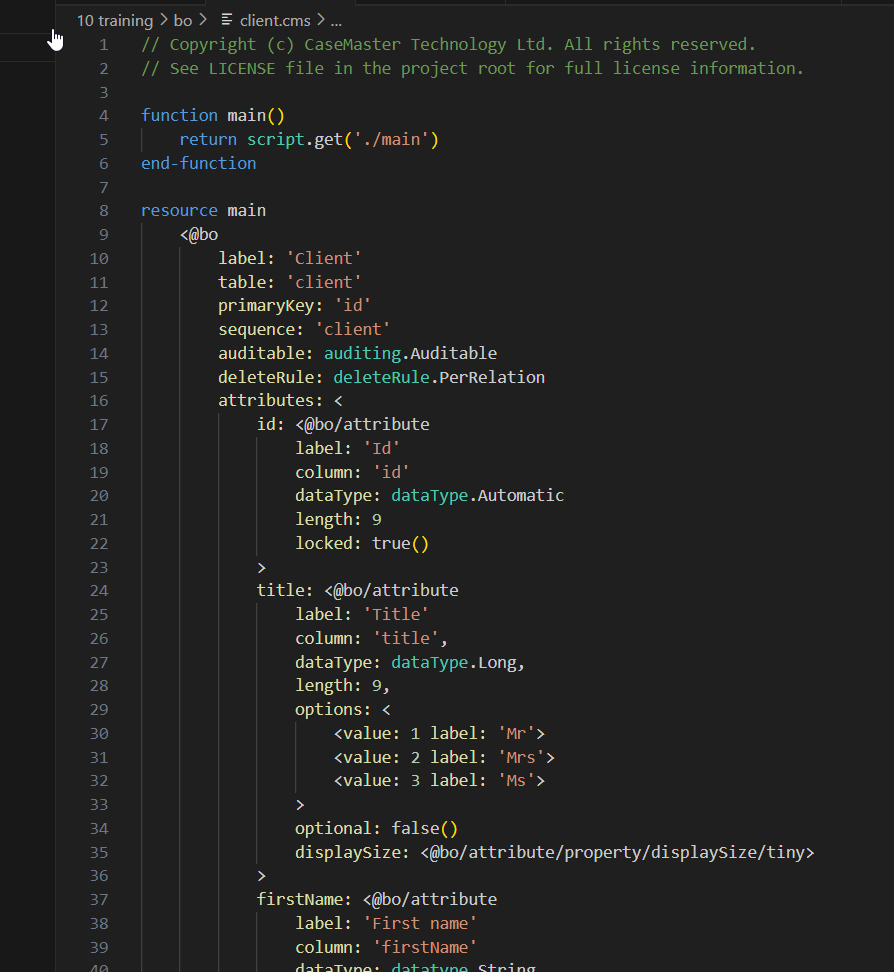
For now, let's ignore the details of the syntax and focus on some features that (hopefully) make sense:
- Line 10 is the label; i.e. what is the name (in plain English) of this BO? This is what we would show on the screen. In this example the name of the BO is the same as the label but in larger systems the BO names can get somewhat cryptic. This example only has a label for the default language (which is English for the training application). CaseMaster also supports multi language labels, a concept that we will cover in another training
- Line 11 is the table in the database where the data is stored. Again, the name of the table is the same as the name of the BO (and the label), in larger systems this is unlikely to be thew case
- From line 17 we list the attributes (a.k.a. properties, fields or columns), each of them with a name, label, data type and some other specifications
- From line 30 you see the 3 possible values for the title of the client
- Line 34 states that the title is not optional (and is thus mandatory)
Attribute Groups
In a descriptor you can define attribute groups. An attribute groups is simply a named collection of one or more (actually: zero or more but why would you...) attributes from this descriptor. You cannot include the same attribute more than once in an attribute group and the sequence of the attributes in the group is significant.
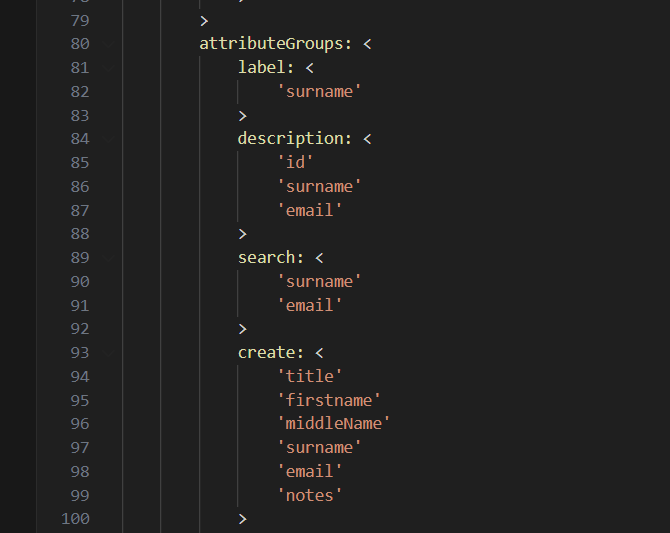
The group description for example contains the attributes 'id', 'surname' and 'email'.
As it happens, it is the description group that we have used to define the columns on the list of clients.
File Names and Folders
The name of the entity corresponds directly with the path of the file.
In our example, the client descriptor file is client.cms in the bo folder. The bo folder is a reserved folder for CaseMaster. This means that the name of the entity is client (without the .cms extension).
A number of folders in the CaseMaster base application folder are reserved and dictated by CaseMaster. The most important ones are:
| Folder | Usage |
|---|---|
| bo | Business objects |
| page | Pages |
| script | Scripts |
| qualifier | Qualifiers |
| document | Documents |
| service | Services |
| static | Static files (such as html, images and Javascript) |
| log | Log files |
| trace | Trace files |
| runtime | The CaseMaster runtime engine |
The file client.cms is a .cms file; cms being short for CaseMaster Script, the CaseMaster programming language.
Each (.cms) file in the bo folder is seen by CaseMaster as a business objects. You can never have a page (or a script, or a qualifier) in the bo folder and business objects can never be found in the page folder.
Inside the bo folder (or the script- , page- or qualifier folder), you can make as many sub-folders as you see fit. The name of the folder becomes part of the name of the business object.
| File | BO Name |
|---|---|
| bo/client.cms | client |
| bo/client/address.cms | client/address |
| bo/client/orders/order.cms | client/orders/order |
Note that we will always use forward slashes in BO names; backslashes have a special meaning in CaseMaster (they escape the next character). client/address and client\\address are equivalent but simply teach yourself never to use backslashes in entity names.
Entity names can obviously only contain characters that are valid in a (Windows) filename. However, do yourself (and your colleague developers) a favour and stick to the following rules:
- Names should consist of letters, digits and underscores (do not use spaces)
- Name should start with a letter or an underscore (not a digit)
- Entity names are not case sensitive (on Windows) but decide-on and stick-to a naming convention (we use lower-camel-case)