Page Basics
reviewed: 6 February 2025
This chapter is better understood when you have access to the CaseMaster 2.0 Primer Training material.
What are Pages and Page Flows
The bulk of CaseMaster development concerns the development of web systems; that is: systems that are accessed by users through a web browser.
In CaseMaster the major building blocks of such systems are .cms files in the page folder. We have seen that all .cms files in the bo folder are by default business objects. Similarly, all .cms files in the page folder (or any sub-folder) are by default pages.
The name 'page file' may be somewhat misleading. It is very likely that a single page file actually contains multiple, related pages. We often refer to a collection of multiple pages that collectively implement a specific system feature as a page flow.
The following is a typical example of a page flow to maintain countries:
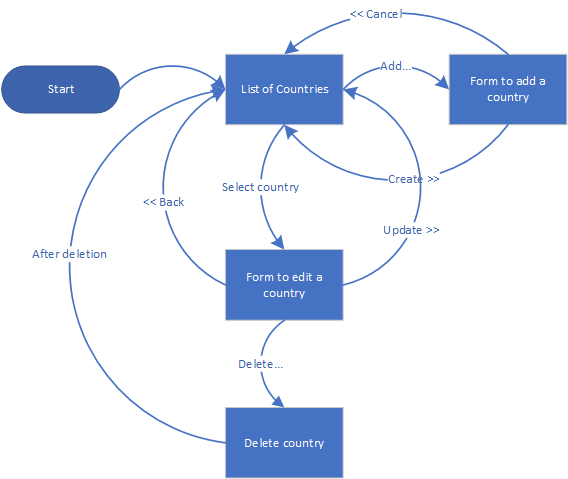
- A list is displayed of countries
- The user can click on the Add... button to add a country
- The user is presented with a form to add a new country
- The user can click on the << Cancel button to abandon the action and return to the list
- The user can complete the details and click on the Create >> button to save the newly created country and return to the list
- The user can select a country from the list to edit the details
- The user is presented with a form to view / edit the details of the selected country
- The user can click on the << Back button to return to the list without updating the data
- The user can click on the Delete... button to delete the selected country and return to the list
- The user can alter the details and click on the Update >> button to save the changes and return to the list
The various pages and actions of this example would typically be included in a single page file.
The Autonomy of a CaseMaster Page URL
A typical CaseMaster page URL could look as follows:
https://casemasterp8.9knots.co.uk/training/page/clients/f/edit?pk=10&__h=b850ede61e589d5b4380c521789b724d
| Part | Usage |
|---|---|
| https:// | Protocol |
| casemasterp8.9knots.co.uk | Server |
| training | Application on server (optional) |
| page | Indicates that the CaseMaster routing is expecting a page |
| clients | The page name; this may consist of multiple parts (sub-folders of the page folder) |
| f | Seperates the name of the page file from the name of the function within the file (optional) |
| ? | Seperates the address part of the URL from the parameters |
| pk=10 | Parameter pk has value 10 |
| & | Parameter separator |
| __h=b850ede61e589d5b4380c521789b724d | Parameter __h and it's value |
You will learn to quickly read CaseMaster URL's. From the example above we can tell there is a file page/clients.cms and that this file will, among other entries, have a function edit.
I would like to pay special attention to the __h parameter. This is a special parameters (as soon as something starts with an underscore in CaseMaster you should pay special attention). The __h parameter is part of the CaseMaster security and is a checksum of the rest of the URL and prevents malicious changes to the URL.
The Autonomy of a CaseMaster Page
Page -> Entry Points
As explained earlier, a page .cms file contains one or more entry points. The simplest way to explain the entry point is to look at it as something that has a URL.
Each entry point is implemented as a function inside a page .cms file (however, not all functions in a page .cms file are entry points but I'll cover that later).
The name of the function (entry point) is included in the URL as we have seen above. One exception applies however; if the URL does not explicitly mention a function, we assume that there is a function n the page .cms file with the name main. The following table shows a couple of examples:
| URL snippet | Page .cms file | Function / Entry point |
|---|---|---|
| page/client | client.cms | main |
| page/client/f/create | client.cms | create |
| page/client/orders/f/edit | client/orders.cms | edit |
| page/client/orders | client/orders.cms | main |
Entry Points -> Processing, Page Definition and Routing
Each entry point can do a combination of things:
- Generate a page and return this to the browser
- Process information POST-ed by the user (POST-ed in uppercase as it refers to the HTTP POST method)
- Some server-side processing without resulting in a page
- Some routing where one entry point hands over control to another entry point
The following is a snippet of a basic but very typical entry point from a page .cms file (note that this example is not intended to learn how to develop pages but is simply added as an example):
// 1
function edit()

    // 2
    set( 'client', bo.quickLoad( 'client', qs.get( 'pk' ) ) )

    // 3
    page.render( page.get( './edit' ) )

end-function


// 4
resource edit

    <@page/container
        content: <@page/content

            <@page/title label: 'Client Maintenance - Edit Client' >

            <@page/data/form
                iterator: iterator.ofBO(
                    <
                        <
                            // 5
                            [client]
                        >
                    >
                )
                groups: 'title,name,email,mobile,dateOfBirth'
                buttons: <@page/content
                    <@page/button
                        label: 'Back'
                        url: 'main'
                    >
                >
            >
        >
    >

end-resource
function edit()defines an entry point. A URL may thus containpage/client/f/edit- We load a client from the database by using a parameter from the URL. The URL would thus be something like
page/client/f/edit?pk=16654 - We generate a page and return this to the browser
- The actual page definition
- Here we refer to the client loaded in step 2
<End of document>