Attributes
reviewed: 23 February 2025
The Subtle Difference Between Attributes and Properties
We have already seen the subtle difference between entities and business objects. A similar difference exists between the terms attributes and properties. You will not get a knock on the door from the CaseMaster police when you use these terms interchangeably, but it is worth understanding the difference.
We have seen that an entity is the definition and a business object is an instantiation.
Similarly, an entity has attributes and a business objects has properties.
The Attributes Section
The attributes section contains the attributes for an entity.
    attributes: <
        id: <@bo/attribute
            label: 'Id'
            column: 'id'
            dataType: dataType.Automatic
            length: 9
            locked: true()
        >
        // and probably many more
    >
Each attribute must have a name unique within this descriptor. The rules for an attribute name are:
- Start with
a-z,0-9or_ - Any number of
a-z,0-9,_,-or.
However, we strongly recommend not to use hyphens (-) or dots (.) in attribute names.
The <@bo/attribute> Property Bag
Each attribute is based on the <@bo/attribute> property bag (known as a qualified property bag).
The number of different tags may seem somewhat overwhelming but most attributes will only use a handful of the options. Most options will have a common-sense default value.
| Tag | Usage | Example |
|---|---|---|
| autocomplete | Indicates whether input field should have autocomplete enabled | true() |
| cached | Indicates whether dynamic value is cached | false() |
| column | Name of column of table (or inline view) | 'name' |
| dataType | Datatype of the attribute | dataType.long |
| defaultValue | Default value of the attribute. Do remember to use a $-expression when not a literal value | $today() |
| displaySize | Defines the onscreen display size | |
| documentType | Defines the attributes document type; only relevant for document foreign keys | IMAGE |
| dynamicValue | Defines the dynamic value of an attribute | $bo.invoke( [_me], 'getFullName' ) |
| encryption | Indicates that the value is stored in the database as encryted | |
| enhancers | Defines any attributes enhancers | |
| ensureLoadGroup | Defines the dynamic attributes ensure load group | * |
| explicit | Defines if the attribute is explicit | false() |
| explicitResolveOnly | Defines if attributes should be resolved explicitly only | true() |
| foreignKey | Defines the attributes foreign key | 'crm/client' |
| foreignKeyAlias | Defines the attributes foreign key alias | 'fromCCY' |
| foreignKeyLabelGroup | Defines the attributes foreign key label group | 'id,name' |
| foreignKeyWhereClause | Defines the foreign key where clause | 'status=3' |
| htmlSafe | Defines if the attribute is safe to be rendered as HTML | true() |
| jsonFormattedPath | Defines the Json-Path or @qualifier to be used for formatted values; only relevant to the JSON data type | //name |
| jsonOrderByPath | Defines the JsonPath to be used in order by groups; only relevant to the JSON data type | //status |
| label | The (on-screen) label of the attribute | 'Name' |
| length | Maximum length of attribute content | 35 |
| locked | Indicates whether attribute is locked on screen | false() |
| maxValue | Maximum value of input that is accepted | 50 |
| minValue | Minimum value of input that is accepted | $today() |
| multiline | Indicates whether input can be multi-line | true() |
| optional | Indicates whether attribute is optional | true() |
| options | Fixed list of options, will show as drop-down on screen | |
| outputMask | Defines the output mask for formatted output | 'standard' |
| password | Indicates whether the attribute is handled as password input | false() |
| placeholder | Defines placeholder for on-screen input | 'Client NIN' |
| plainTextAttr | (Relevant for dynamic attributes) Plain text equivalent attribute | 'status' |
| precision | Precision for decimal / double | 2 |
| readOnly | Indicates whether column is read-only | false() |
| sortAttr | (Relevant for dynamic attributes) Sort equivalent attribute | 'name' |
| soundex | Defines if the attribute should use soundex for qsearch | true() |
| tags | Defines the attributes tags | |
| testData | Expression that defines the test data for this attribute | tdg.company() |
| textCase | The case of textual data | textCase.upperCase |
| virtualColumn | Valid select statement | 'select name from rdCountry where country=@me.country' |
Note that some tags result in client-side validation when you use the attribute in an HTML, online environment. These are:
optional: uses the HTMLrequiredattributemaxValue: uses the HTMLmaxattributeminValue: uses the HTMLminattributeoptions: user can only select a value from the drop down- Adherence to the correct datatype when you use the correct pre-defined attribute type (see here)
Data Types
All CaseMaster attributes have a data type. Attributes can have the same data types as variables but one needs to be aware that not all CaseMaster datatype map sensibly on database column datatypes.
| Datatype | Usage | Example | Database Equivalent |
|---|---|---|---|
| Automatic | Guaranteed unique number (maintained by CaseMaster) | 12 |
Long integer |
| Autonumber | Guaranteed unique number (maintained by database) | 12 |
Long integer |
| Boolean | Boolean | 'true()' | bit, int or boolean (depending on database) |
| BusinessObject | Handle to a business object | N.a. | |
| BusinessObjectIterator | Handle to a BO iterator | N.a. | |
| Date | Date | 12FEB25 | Date |
| Decimal | Decimal with fixed precision | 12.88 |
Decimal |
| Double | Double precision | 9.0087 | Double precision |
| Expression | CaseMaster expression | add( 12, 18 ) |
Unicode string |
| JSON | JSON | { "name":"Bertus" } |
Unicode string |
| Long | Long integer | 8 |
Long integer |
| Object | Handle to an object | N.a. | |
| Propertybag | CaseMaster property bag | < a:12 b: 23 > |
Unicode string |
| String | Text string | 'BD' |
Unicode string |
| Time | Time | 22:15 |
date or string (depending on database) |
| Timestamp | Date and time | 12FEB25 22:15:00 |
timestamp |
Length and Precision
For datatypes double and decimal, the precision is included in the length; for example a length of 8 and a precision of 2 means a maximum of 6 positions left of the decimal point and 2 after.
For datatype string the length 32000 is considered max length and, where supported by the database, will result in a variable, max length column. The input is not truncated, not when it is set and not when the data is entered on screen.
Options
The options feature is used to limit the input to a predefined number of options. The following example shows an example with 3 options.
    title: <@bo/attribute
        label: 'Title'
        column: 'title'
        dataType: dataType.Long
        length: 9
        options: <
            < value: 1 label: 'Mr' >
            < value: 2 label: 'Mrs' >
            < value: 3 label: 'Ms' >
        >
        optional: false()
        defaultValue: 1
        displaySize: <@bo/attribute/property/displaySize/tiny>
    >
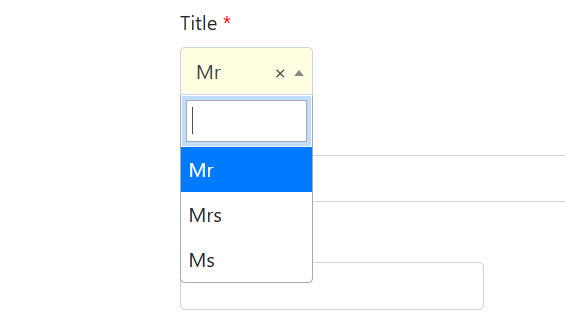
Note the difference between the value (1, 2 or 3) and the on-screen label (Mr, Mrs and Ms).
Note that if you try to set the value programmatically, you will NOT get an error if the value is not 1, 2 or 3. One could argue that it should be better if CaseMaster would raise an error...
Outputmask
The outputmask option defines how the value of the attribute is formatted (e.g. for on-screen use).
Note that the output mask is mainly case insensitive.
| Output mask | Datatype(s) | Output |
|---|---|---|
yes/no |
Boolean | Yes for true, No for false; takes culture into consideration |
true/false |
Boolean | True for true, False for false; takes culture into consideration |
on/off |
Boolean | On for true, Off for false; takes culture into consideration |
standard |
Decimal / double | 0.00 (2 decimal places, thousand seperator); takes culture into consideration |
currency |
Decimal / double | As standard but with currency symbol; takes culture into consideration |
x/y |
Boolean | Where x and y can be anything; x when true, y when false |
GBP |
Decimal / double | As standard but with Pound Sterling symbol; takes culture into consideration |
EUR |
Decimal / double | As standard but with Euro symbol; takes culture into consideration |
date |
Date | Format date using standard date formatting rules; see here |
datetime |
Date | Format date using standard timestamp formatting rules |
timestamp |
Timestamp | Synonym as datetime |
time |
Time, timestamp | Format date using standard time formatting rules |
longdate |
Date, timestamp | Format date using standard long date formatting rules |
shortdate |
Date, timestamp | Format date using standard short date formatting rules |
| Other | Dates, numerics | Use the special .Net formatting rules |
Special rules apply for JSON; see here.
The following shows the various output masks in action (but understand that the output may differ on you server based on culture settings).
function doTest()

    response.write( format( 12, 'standard') )           response.write( '<br>' )
    response.write( format( 12.12, 'standard') )        response.write( '<br>' )
    response.write( format( 0, 'standard') )            response.write( '<br>' )
    response.write( format( -6123.78, 'standard') )     response.write( '<br>' )
    response.write( format( 12.12, 'currency') )        response.write( '<br>' )
    response.write( format( true(), 'on/off') )         response.write( '<br>' )
    response.write( format( true(), 'sure/no way') )    response.write( '<br>' )
    response.write( format( now(), 'shortdate') )       response.write( '<br>' )
    response.write( format( now(), 'longdate') )        response.write( '<br>' )
    response.write( format( now(), 'date') )            response.write( '<br>' )
    response.write( format( now(), 'time') )            response.write( '<br>' )

    // Output
    // 12.00
    // 12.12
    // 0.00
    // -6,123.78
    // £12.12
    // On
    // sure
    // 01/03/2025
    // 01 March 2025
    // 01 March 2025
    // 16:20:53

end-function
Pre-defined Attribute Types
There is a number of attribute qualifiers that provide a convenient pre-set of default values for specific purposes.
The most important are:
| Helper | Usage |
|---|---|
<@bo/attribute/Boolean> |
Datatype defaults to Boolean |
<@bo/attribute/date> |
Datatype defaults to date |
<@bo/attribute/document> |
Foreign key set to document, default document type set to 'contact' |
<@bo/attribute/dynamic> |
String, length max, locked and explicit |
<@bo/attribute/email> |
String, length 100, lowercase, placeholder |
<@bo/attribute/expression> |
String, length max, display size lg and inputdir='ltr' |
<@bo/attribute/id> |
Automatic, column 'id', length 9, locked |
<@bo/attribute/JSON> |
String, length max |
<@bo/attribute/memo> |
String, length max, multi-line |
<@bo/attribute/multilanguage> |
See here |
<@bo/attribute/password> |
String 100, password:true() |
<@bo/attribute/time> |
Time |
<@bo/attribute/timestamp> |
Timestamp |
However, there are additional benefits for using appropriate helper attribute qualifiers where such exists. For example, some helper attribute qualifier will force the use of a specific HTML5 input type (and thus help with restricting the input to valid data only). These types are:
<@bo/attribute/email><@bo/attribute/url><@bo/attribute/telephone><@bo/attribute/month><@bo/attribute/week><@bo/attribute/color>
Defined Attribute Groups
CaseMaster has the concept of attribute groups. An attribute group is a named collection of zero or more attributes in a specific sequence.
Attribute groups are a great way to make a system more maintainable as often simple change requests involve adding fields to a form, removing columns from a list or changing the sequence of attributes for a calendar entry.
    attributeGroups: <
        label: <
            'surname'
        >
        description: <
            '_formalName'
            'dob'
            'email'
        >
    >
The example above shows two attribute groups: label and description. Each attribute is simply a list of zero or more attributes from this entity.
The naming conventions for attribute groups are similar to that of attributes except that it is quite common to dots (.) in the name.
An attribute cannot appear more then once in an attribute group.
Also make sure that you never have an attribute with the same name as an attribute group or refer to a non-existing attribute in an attribute group.
Ad-hoc Attribute Groups
There are many places in a script, property bag or expression where an attribute group is expected. The following expression loads client with id = 10 but onlyu loads the atributes in the description group.
set( 'c', bo.quickLoad( 'client', 10, 'id', 'description' ) )
Anywhere in the system where a group is expected, you can also use what is known as an ad-hoc attribute group.
An ad-hoc group is simply a comma separated list of attribute and attribute group names.
| Ad-hoc Group | Usage |
|---|---|
id |
Group with only the id attribute |
description |
Group with only the description attribute group |
id,description |
Group with the attribute id followed by the description attribute group |
description,id |
Same but group first, followed by id |
id,description,id |
id, followed by description (the final id is ignored) |
You can use the minus (-) to take attributes out of the ad-hoc group:
| Ad-hoc Group | Usage |
|---|---|
description,-status |
The content of the description group without the attribute status |
id,description,-id,id |
The description group followed by id |
Reserved Groups
There are a number of reserved groups.
| Reserved Group | Usage |
|---|---|
+ |
Synonym for the primary key of an entity |
label |
Relevant for foreign keys; see here for more info |
search |
Relevant for quick search tables' see here for more info |
description |
Standard group used for columns in a table |
@ |
Synonym for all attributes |
* |
Synonym for all attributes without the explicit attributes; see here for more info |
! |
Synonym for the audit attributes; see here for more info |
!! |
Refers to cmUpdatedId; see here for more info |
null |
A group with no attributes |
empty |
Synonym for null |
~ |
The attributes that have been touched (see here) |
~~ |
The attributes that are dirty (see here) |
Formatted vs Raw Values
The term raw value is used to refer to the value as it is stored in the database. The alternative of the raw value is the formatted value. The formatted value will take the raw value and format it as per the definition of the attribute.
There are a number of scenarios where the raw value and the formatted value differ:
| Scenario | Details |
|---|---|
| Options | Label associated with raw value is displayed; see here |
| Foreign key | The label attribute group of the foreign key entity is displayed; se here |
| Output mask | The output mask is applied to the raw value |
| Password | A series of asteriks (*) is displayed |
| JSON formatted path | See here |
| Numeric | Numeric values are displayed according to local culture and precision (where applicable) |
| Date / time | Date / time values are displayed according to local culture |
Display Size
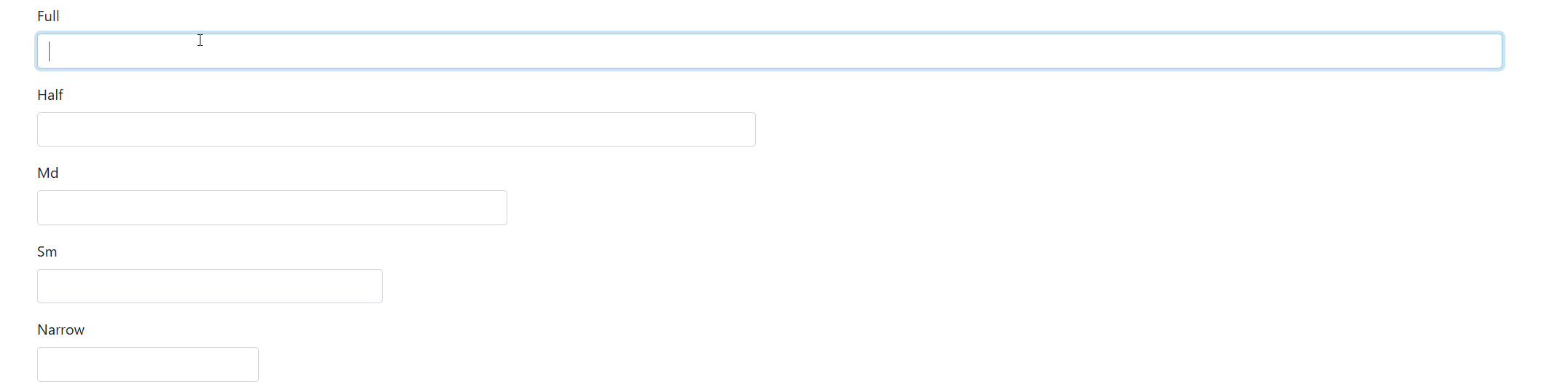
The display size option of an attribute dictates the width of the attribute on an edit form.
Take the following example:
        text1: <@bo/attribute
            label: 'Full'
            dataType: datatype.String
            length: 200
            displaySize: <@bo/attribute/property/displaySize/full>
        >
        text2: <@bo/attribute
            label: 'Half'
            dataType: datatype.String
            length: 200
            displaySize: <@bo/attribute/property/displaySize/half>
        >
        text3: <@bo/attribute
            label: 'Md'
            dataType: datatype.String
            length: 200
            displaySize: <@bo/attribute/property/displaySize/md>
        >
        text4: <@bo/attribute
            label: 'Sm'
            dataType: datatype.String
            length: 200
            displaySize: <@bo/attribute/property/displaySize/sm>
        >
        text5: <@bo/attribute
            label: 'Narrow'
            dataType: datatype.String
            length: 200
            displaySize: <@bo/attribute/property/displaySize/narrow>
        >
This will render as follows:
Dynamic Attributes
Dynamic attributes are attributes whose value is based on an expression (and thus does not come from the database).
By this definition, a dynamic attribute does not have a column (as the data is not stored in the database) and is locked (as the data cannot be edited by the user).
Imagine an entity client which has the attributes firstName, middleName and surName. A logical dynmaic attribute would be one that displays the fullname. This could be implemented as per following example:
    _fullName: <@bo/attribute/dynamic
        label: 'Name'
        dynamicValue: $buildString(
            ' ',
            bo.attr( [_me], 'firstName' ),
            bo.attr( [_me], 'middleName' ),
            bo.attr( [_me], 'surName' )
        )
        ensureLoadGroup: 'title,firstName,middleName,surName'
        sortAttr: 'firstName'
    >
Example of result:

- The name
_fullNameshows a common naming convention where dynamic attributes have a name that starts with an underscore (_) to set them apart. This is not a requirement but makes it easier to recognize a dynamic attribute - The qualifier
<@bo/attribute/dynamic>has all the logical default settings for a dynamic attribute. The default datatype is a string but you can also explicitly add adatatypetag - The
dynamicValuetag has the expression that is used to provide the value. Note the dollar sign ($) in front of the expression which is essential. This is explained in more detail here - The
ensureLoadGrouptag can be used to tell CaseMaster that certain attributes must be present in order to successfully evaluate the dynamic value expression. CaseMaster will ensure that these values are loaded from the database (when possible) - The
sortAttrtag can be used to allow sorting on the dynamic attribute in a list. Normally, you cannot sort on a dynamic attribute as sorting is done through the database. Often, the order of dynamic attribute values is directly linked to a traditional attribute (i.e. one that is linked to a column in the database)
The HTMLSafe Option
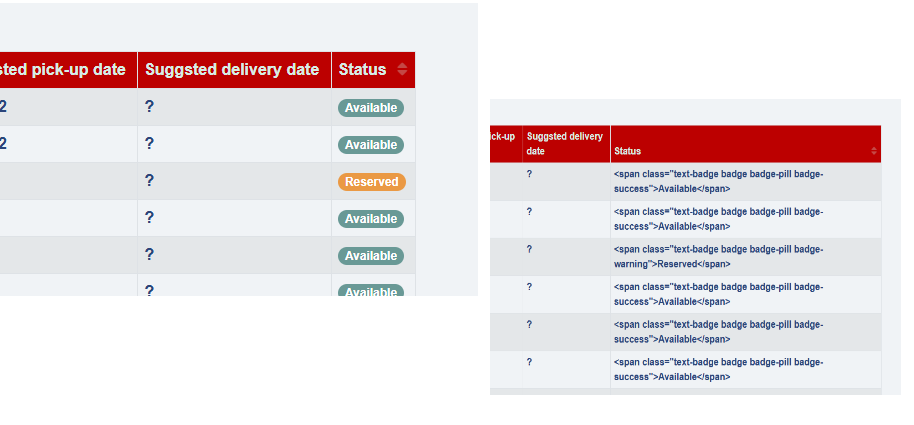
A dynamic attribute may return HTML. Normally, CaseMaster will encode HTML to limit the chances of HTML injection, a common way of hacking a system.
Use the htmlSafe tag when:
- A dynamic attribute returns HTML and you are sure the content is never harmful
- A standard attribute may contain HTML and you are sure the content is never harmful
    _status: <@bo/attribute/dynamic
        label: <@mlText 'Status'>
        ensureLoadGroup: 'status,salesOrder'
        sortAttr: 'status'
        dynamicValue: $bo.invoke( [_me], 'getStatus', html:true() )
        plainTextAttr: '_statusTextOnly'
        htmlSafe: true()
    >
The difference between htmlSafe:false() and htmlSafe:true() is shown here:
Explicit Attributes
We have seen before that * and @ are both reserved attribute group names. @ is short for all attributes and * is short for all implicit attributes. All attributes are implicit unless they have been marked as explicit using the explicit tag. Dynamic attributes are by default marked as explicit. For illustration only, the explicit tag has been added and set to true().
    _fullName: <@bo/attribute/dynamic
        label: 'Name'
        dynamicValue: $buildString(
            ' ',
            bo.attr( [_me], 'firstName' ),
            bo.attr( [_me], 'middleName' ),
            bo.attr( [_me], 'surName' )
        )
        ensureLoadGroup: 'title,firstName,middleName,surName'
        sortAttr: 'firstName'
        explicit: true()
    >
Many CaseMaster functions use * as the default attribute group. And many developers are economic coders (I avoid to use the word 'lazy') and do not set the optional attribute group parameter so thew system defaults to all implicit attributes.
A dynamic attribute can have have an expression that may include complex calculations or database calls. Evaluating the expression when you are not really interested in the value would be a waste of server resources.
By marking a dynamic attribute as explicit (which is the default), the dynamic attribute is ignored whenever the system does an operation on the * attribute group (because the developer is such an economic coder).
When are Dynamic Attributes Evaluated
CaseMaster tries to be efficient and will only evaluate the dynamic value expression when it has to.
Effectively, the expression is only evaluated once per persist life cycle. The concept of the persist life cycle is explained here but can be summarized as follows:
- A
persist life cyclestarts when one of the following is true - When a new BO is created
- When a BO is reset using the
bo.reset()function - When a BO is read from the database (which can be done in a number of ways)
- A
persist life cyclestarte when - A new persist life cycle is started
You typically do not have to worry about this and assume the default behaviour of CaseMaster is fine. I would say that when you know you need to worry about this, you are such an advanced CaseMaster developer that you do not need to read the how and why in this document.
The Cached Tag
Ok, so if you do have to worry about the timing of evaluation, you simply set the cached tag to false().
    _fullName: <@bo/attribute/dynamic
        label: 'Name'
        dynamicValue: $buildString(
            ' ',
            bo.attr( [_me], 'firstName' ),
            bo.attr( [_me], 'middleName' ),
            bo.attr( [_me], 'surName' )
        )
        ensureLoadGroup: 'title,firstName,middleName,surName'
        sortAttr: 'firstName'
        explicit: true()
        cached: true()
    >
Note that this can easily double the times that the dynamic value expression is evaluated.
Virtual Columns
The virtual column feature is highly advanced and is often used in one of the following scenarios:
- You need an attribute that you would typically implement as a dynamic attribute but the user mst be able to search on the value of the attribute. You can not search on a dynamic value because searching is done using the database
- The user must be able to sort on the attribute but the sortAttr trick (as explained here) does not work
- The performance is better when done through the database than it would be when done as a dynamic attribute
    // This virtual column has been added for performance
    _applicationStatus: <@bo/attribute
        label: 'Application status'
        column: '( select max(status) from edApplication where journey=@me.id and status in (2, 3) )'
        virtualColumn: true()
        dataType: dataType.Long
        length: 9
        options: <
            <value: 2 label: 'Interview pending' >
            <value: 3 label: 'Offer made' >
        >
        explicit: true()
    >
Notes:
- We have again used the underscore naming convention to make the attribute stand out as special
- We have used the
explicittag to ensure the attribute is ignored when we rely on the default*attribute group
The column is now a SQL statement that is meaningful in a select statement on the table associated with this entity.
In this SQL you can refer to @me to mean 'this table'.
Virtual columns are excluded from insert and update statements.
Encrypted Columns
You can use the encrypted feature to store highly sensitive data in the database as an encrypted string. This means the data is unusable if anyone ever has direct access to the database.
    medicalInfo: <@bo/attribute
        label: 'Medical info'
        column: 'medicalInfo'
        encryption: <@bo/attribute/property/encryption>
        dataType: datatype.String
        length: 200
    >
Important note: if you ever change the encryption settings of your application, the data can no longer be read. Read more about security (and CaseMaster encryption) here.
Attribute Enhancers
Attribute enhancers are used to enhance the appearance of an attribute on screen. There are many enhancers that you can add; this feature will be covered in more detail here.
    icon: <@bo/attribute
        label: 'Icon'
        column: 'icon'
        dataType: dataType.String
        length: 100
        enhancers: <@bo/attribute/property/enhancers
            postInput: <@page/text/small
                class: 'text-muted',
                content: 'Font Awesome icone name'
            >
        >
    >
The on-screen effect of the enhancer above:

Attribute Tags
We have already learned about tags on entities here.
Tags have two purposes; you can add custom tags to an attribute for use somewhere in your system. This can be useful when are writing generic code. You may want to use a specific tag to drive certain behaviour.
The following example shows a snippet of code where a specific tag is checked.
    if boDesc.getAttrTag( [BO], [attr], 'sensitive' )
        // Do something special
    else
        // Do something else
    end-if
Each tag is a property bag tag:
    dob: <@bo/attribute/date
        label: 'Date of birth'
        column: 'dob'
        tags: <
            sensitive: false()
        >
    >
There is a number of reserved attribute tag names that have a specific meaning for CaseMaster. These are:
| Tag | Usage | Example |
|---|---|---|
| alias | Alias for attribute so you can access attribute by multiple names; mainly used for application migration purposes | zXUpdtdWhn |
| qsearchEntitySize | Force the entity size for qsearch purposes | 0 |
| soundex | Flags this attribute as a soundex value | true() |
<End of document>