# Sequences, Automatics and Autonumbers
reviewed: 2 March 2025
In this document we look at ways to generate guaranteed, unique values for primary keys.
Automatics and Sequences
You often see that primary key attributes of entities have the datatype automatic.
    <@bo
        label: 'Event'
        table: 'eventEvent'
        primaryKey: 'id'
        deleteRule: deleteRule.PerRelation
        auditable: auditing.Auditable
        sequence: 'eventEvent'
        attributes: <
            id: <@bo/attribute
                label: 'Id'
                column: 'id'
                dataType: dataType.Automatic
                length: 9
                locked: true()
                optional: false()
            >
    // More stuff here
If you have an attribute with the datatype automatic you must also set the sequence tag.
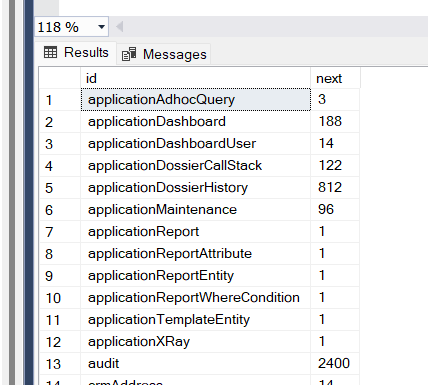
CaseMaster uses the sequence table to store the next sequence number for automatics. It is possible to have multiple entities sharing the same sequence.
Automatics are guaranteed to be unique and are also guaranteed to go up in value (small disclaimer, see paragraph on sequence steps). The latter means that ordering by an attribute of datatype automatic means ordering in order of creation.
The following shows typical values in the sequence table:
A new sequence is assigned using the bo.setAutomatics() function.
    set( 'c', bo.create( 'client' ) )

    bo.reset( [c] )
    bo.setAutomatics( [c] )
An entity can be associated with an alternative datasource (see here). Unless specified otherwise, the sequences are still stored in the primary datasource.
You can use the useOwnDataSourceForSequence tag to specify that a sequence table exists in the alternative datasource.
useOwnDataSourceForSequence: true()
You can update the sequence table to influence the next sequence number; for example, clients may wish to start the sequence for orders of invoices at 10,000 instead of 1.
Sequence Steps
By default, each new automatic value is one up from the previously assigned automatic (for a given sequence). You can use the sequenceStep tag to explicitly set the value:
sequenceStep: 2
A common scenario for using a sequence step other than 1 is when the development team may create new reference entries in a table where the application managers also add rows in the live system.
- Set sequenceStep to 2
- Make sure the next sequence number in the live system starts at 1 (so only odd numbers are generated by the application managers)
- Make sure the next sequence number in the development system starts at 2 (so only even numbers are generated by the developers)
This set-up means that developers can safely release 'their' reference data rows to the live system without risking duplicate rows.
Autonumbers
An alternative of the automatic datatype is the autonumber datatype. This will use the auto number feature of the database (assuming this is supported).
You typically use autonumber feature in the following scenarios:
- You have no control over the table (e.g. dealing with a legacy system) and the table has an
autonumberprimary key - A table has a high volume of inserts and performance is key (
autonumberis faster thanautomatic)
Special Scenarios for Use of Automatics
The automatic datatype is typically only used for primary key attributes. However, you can also use automatic for non-primary key attributes, for example whe you want to generate unique, increasing numbers for other reasons.
Note: make sure to use the optional second parameter to the bo.setAutomatics() function!
bo.setAutomatics( [invoice], 'invoiceReference' )
<End of document>