# Foreign Keys
reviewed: 4 March 2025
Foreign keys implement what the 'R' standards for in RDBMS (Relational Database Management System). A foreign key is an attribute in one entity that points to the primary key of another entity (although the other entity could even be itself...).
Foreign key handling is a vital part of CaseMaster as we have tried to make it as easy as possible for developer:
- No need to think about outer or inner joins
- No need to think about translating a foreign key value to a meaningful label
- No need to think about populating option lists for foreign key attributes on forms
- Etc
Basics
A foreign key attribute is created by adding the foreignKey tag as shown in the following example:
    event: <@bo/attribute
        label: 'Event'
        column: 'event'
        dataType: dataType.long
        length: 9
        foreignKey: 'event/event'
        optional: false()
        locked: true()
    >
The foriegnKey tag simply specifies the name of the entity that the foreign key points to.
The primary key of the other entity must be of the same datatype as the foreign key attribute. In the example above, the primary key of the entity event/event is dataType.automatic which is a variation of a long (just like autonumber is). The two entities are now linked.
Typical examples:
orderLineHas a foreign key toorderorderHas a foreign key toclientorderLineHas a foreign key toproduct
Option Lists and the Label and Search Attribute Group
The easiest way to see a foreign key in action is on an edit form where a foreign key attribute will render as a searchable drop-down.
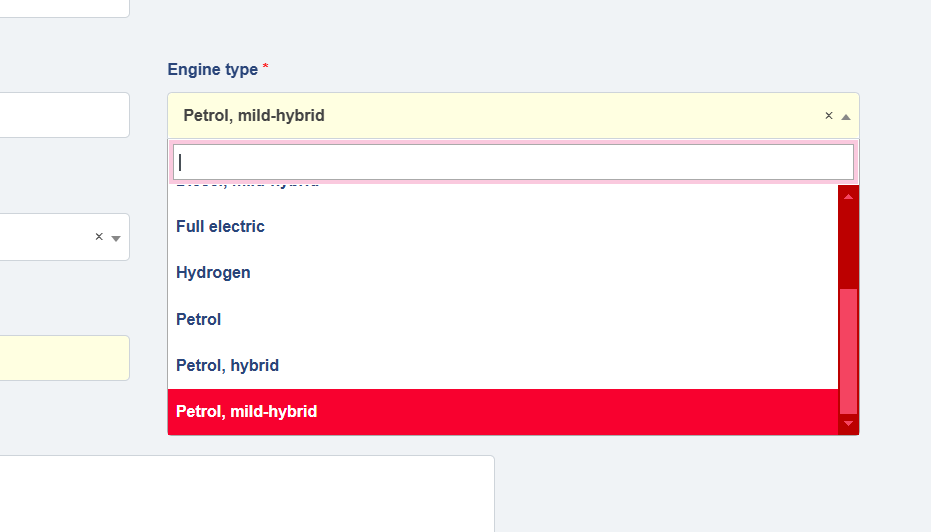
- The drop-down will list all the available record from the linked entity (note: unless specified otherwise)
- The entries shown in the drop-down are generated using the
labelattribute group (note: unless specified otherwise) - The entries are order by the primary key (again: unless specified otherwise)
- The user can search by the attributes in the
searchattribute group (again, unless...)
Load BO by Foreign Key Using bo.loadFK()
The function bo.loadFK() is a fast way of loading a related BO. See the following example code that is copied from a method of the orderLine entity from the examples above:
    set( 'order', bo.loadFK( [_me], 'order') )
    set( 'client', bo.loadFK( [order], 'client') )
    set( 'product', bo.loadFK( [_me_], 'product') )
Formatted Value
We have seen here that there is an important difference between the raw value and the formatted value of a property.
See another example using the orderLine entity:
    response.write( bo.attr( [_me], 'order') )
    response.write( '<br>' )
    response.write( bo.attrFormatted( [_me], 'order') )
    response.write( '<br>' )

    // Output
    // 1776
    // Philips 3MAR25
The raw value of the order is simply the primary key of the order that this order line is for. The formatted value is takes the label attribute group of the order entity and generates a suitable label based on that (in this example the label attribute group contains client and orderDate).
Note that the client attribute of order is also a foreign key and CaseMaster will have recursively done the necessary to get the formatted value of that as well.
Arrow-attributes in bo.attr() and bo.attrFormatted()
Another convenient feature of CaseMaster foreign keys is the use of arrow-attributes. Again, lets assume we are in a method of our (now infamous) orderLine object.
response.write( bo.attr( [_me], 'order->client' ) )
This example refers to my attribute order (which must be a foreign key attribute) and the arrow-notation means we are actually interested in the raw value of the client attribute of the linked order. Now, we have already seen that the client attribute on order itself is also a foreign key so the following is also possible:
response.write( bo.attrFormatted( [_me], 'order->client->status' ) )
Couple of pointers about the arrow-notation:
- The arrow-notation is only supported in the functions
bo.attr()andbo.attrFormatted() - The arrow-notation will only work if the foreign key attribute has a value
- Behind the scenes, CaseMaster will have to load data from the database and each arrow results in one more (select) query. Beware of a possible performance impact
The ensureLoadGroup attribute tag revisited
Take the following example:
response.write( bo.attr( [_me], 'order->client->_fullAddress' ) )
Where _fullAddress is a dynamic attribute that takes the attributes address, houseNumber, postcode, town and country and turns it into a full address.
You can imagine that behind the scenes this scenario would not work out as expected:
- CaseMaster will understand it needs to load
orderbased on theorder->notation - It will decide to load the value of
clientas that is on the right-hand-side of the-> - It now realizes it needs to load data from
clientbecause of the 2nd-> - As
_fullAddressis a dynamic attribute, it has no column so CaseMaster does not understand what it needs to load
This isa perfect example of where the ensureLoadGroup comes to play (see here) as this tells CaseMaster which attributes need to be loaded from the database to ensure the dynamic value expression can be evaluated correctly.
    _fullAddress: <@bo/attribute/dynamic
        label: 'Address'
        ensureLoadGroup: 'street,houseNumber,town,postcode,country'
        dynamicValue: $script.call(
            'helpers:formatFullAddress',
            [_me]
        )
    >
Note: the above example is not about the formatFullAddress function of the helpers script.
Resolving foreign keys
We have seen a number of situations where CaseMaster translates the raw value of a foreign key attribute (e.g. 12, 1887 or 226) to something meaningful ('B Dispa', 'Philips 5MAR25' or 'Netherlands').
This is known as 'resolving foreign keys' and is a rather ingenious mechanism behind the scenes.
When you opt to have any foreign keys resolved (and this happens in the various way in which you can load data from the database), CaseMaster will automatically create a join query so that the relevant data from the linked table(s) is loaded in a single query so that foreign keys can be resolved. Read more here.
Specific attribute tags related to foreign keys
There are a number of tags of <@bo/attribute> related to foreign keys:
| Tag | Usage |
|---|---|
| foreignKeyAlias | Useful when theer are two foreign key attributes pointing to the same other entity or a foreign key attribute pointing to itself; avoids confusion in generated SQL |
| foreignKeyWhereClause | Useful when you need to restrict the available entries in a drop-down; e.g. to only active entries or so |
| foreignKeyLabelGroup | Use this when you want to use a different attribute group for label purposes |
| foreignKeySortGroup | Used to force the sequence in drop-downs (normally sorted by primary key of the foreign key entity) |
| explicitResolveOnly | Use when you want to exclude this foreign key attribute from being resolved if the resolve group is * |
Performance hints, tips and pitfalls
- Use the resolve foreign key option where available if:
- You are using
bo.attrFormatted()on a foreign key attribute after loading data - One of the columns of a list is a foreign key attribute
- Beware of the extra database call required for arrow-attributes
- Ensure the primary key of the foreign entity is of the same type as the foreign key attribute (as otherwise a type cast has to be done when generating a join query)
<End of document>