# Auditing
reviewed: 14 March 2025
The term Auditing covers two CaseMaster features that help with answering the questions who, when and what.
Simple Auditing
The BO Audit Attributes (auditing.Auditable)
The simplest way to add basic auditing to a business object is by setting the auditable tag on the <@bo> qualifier as shown in the following example:
resource main
    <@bo
        label: 'Client'
        table: 'client'
        primaryKey: 'id'
        sequence: 'client'
        auditable: auditing.Auditable
        deleteRule: deleteRule.PerRelation
        sequenceStep: 2
Doing so will automatically add 4 attributes (with columns) with reserved names to the business object. Note that these attributes do / should not appear in the entity .cms file; they are automatically created when the descriptor is first created.
| Attribute | Datatype | Usage |
|---|---|---|
cmCreatedBy |
Long |
The PK of user whom created the BO |
cmCreatedWhen |
Timestamp |
The timestamp when the BO was reset |
cmUpdatedBy |
Long |
The PK of user whom last updated the row |
cmUpdatedWhen |
Timestamp |
The timestamp when the BO was last persisted |
Note that cmCreatedBy and cmUpdatedBy are not implemented as foreign keys to avoid them being involved in queries because of resolving foreign keys.
In addition to the 4 attributes above, setting the auditable tag also gives you 3 dynamic attributes:
| Attribute | Datatype | Usage |
|---|---|---|
_cmCreatedBy |
String |
Returns the name of the user whom created the BO |
_cmUpdatedBy |
String |
Returns the name of the user whom last updated the BO |
_auditStatus |
String |
Returns a single-field summary of the audit fields; see example |
_audit |
String |
Can be used for extended auditing purposes, see later |
Example of _auditStatus:
Created by Bertus Dispa on 08/12/2023 14:58; updated by Bertus Dispa on 11/01/2024 21:26
The BO Audit Attributes (auditing.ConcurrencyControl)
You can also set the auditable tag to auditing.ConcurrencyControl. This gives you the 4 extra attributes you get with auditing.Auditable but it also give you one other attribute:
| Attribute | Datatype | Usage |
|---|---|---|
cmUpdatedId |
Long |
Will be set to a unique value on insert and with every update |
Concurrency control has been designed for the following scenario:
- User 1 selects a record from a list with a view to edit
- User 2 selects the same record with a view to edit
- User 1 gets interrupted by a phone call
- User 2 makes the changes and saves the record
- When the call is done, user 1 makes the changes and saves the record
The net result is that the changes made by user 2 are overwritten by the changes of user 1.
I the auditing of the entity was set for auditing.ConcurrencyControl, the scenario would be:
- User 1 selects a record from a list with a view to edit
- User 2 selects the same record with a view to edit
- User 1 gets interrupted by a phone call
- User 2 makes the changes and saves the record
- When the call is done, user 1 makes the changes and tries to save the record but get an error message from CaseMaster that the record has been updated since it was last retrieved
Extended Auditing
Extended auditing allow you to write an audit record at certain key events. The following shows a typical audit trail:
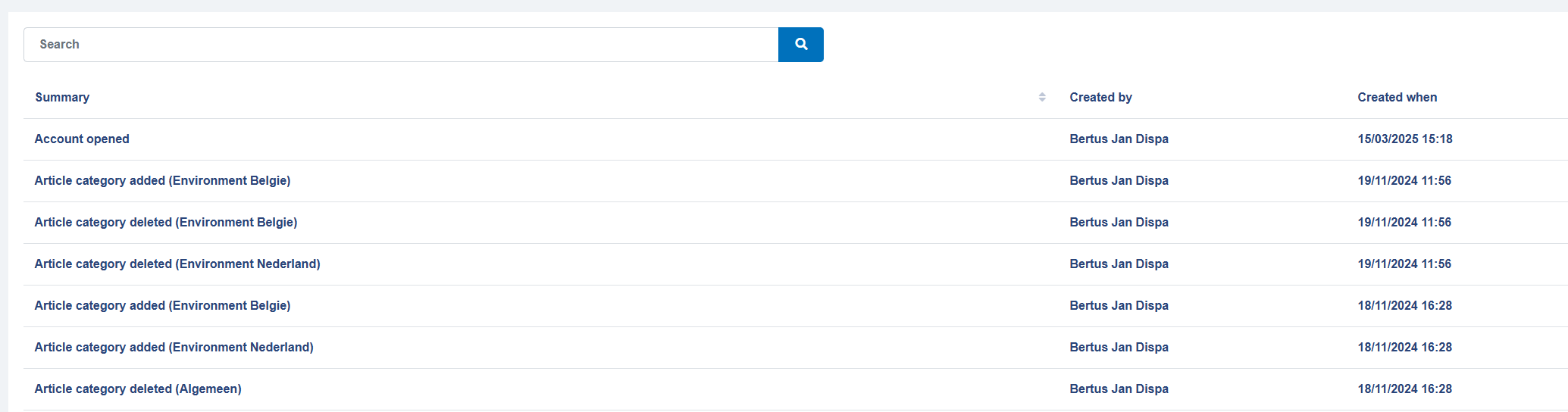
Each audit entry has a number of attributes:
| Attribute | Usage |
|---|---|
| Entity | The name of the entity the audit record is for |
| PK | The PK vaue of the entity the audit record is for |
| Audit | The type of audit record |
| Anchor entity | See paragraph on anchors (optional) |
| Anchor entity PK | See paragraph on anchors (optional) |
| Details | Serialized values at time of audit (optional) |
| cmCreatedBy | Who created the audit entry |
| cmCreatedWhen | When was the audit entry created |
| cmUpdatedBy | Who last updated the audit entry (should always be same as cmCreatedBy) |
| cmUpdatedWhen | When was the audit entry last updated (should always be the same as cmUpdatedBy) |
Audit Types
Audit entries are written based on audit types. Audit types are defined as part of the <@bo> qualifier in a business object .cms file.
The following shows a typical audits section for a BO:
    audits: <
        insert: <@bo/audit
            summary: 'Account created'
        >,
        update: <@bo/audit
            summary: 'Account updated'
        >,
        action: <@bo/audit
            summary: $bo.attr( [_me], '_auditAction')
        >,
        delete: <@bo/audit
            summary: 'Account deleted'
        >
        opened: <@bo/audit
            summary: 'Account opened'
        >
    >
Note the $-expression if the summary is not a simple static string!
The <@bo/audit> qualifier has the following tags:
| Attribute | Usage |
|---|---|
summary |
The summary as stored in the database (see screen shot in previous paragraph) |
primary |
Indicates whether this is a primary audit entry (defaults to true) |
group |
Optional attribute group whose values will be serialized |
ensureLoadGroup |
Optional attributes that will be loaded from the database (assuming PK is set) (optional) |
anchorEntity |
See paragraph on anchors (optional) |
anchorPK |
See paragraph on anchors (optional) |
Writing Audits
Audits are not created automatically just because the audit types are defined. Typically, you add code to the _eventAction method to write the audit entries. The following is the code associated with the audit type examples as shown in the previous paragraph:
    // Write audit
    if and(
        eq( [timing], eventActionTiming.Pre ),
        or(
            in( [type], eventActionType.Insert, eventActionType.Delete ),
            and(
                eq( [type], eventActionType.Update ),
                ne( [group], null() )
            )
        )
    )
        bo.writeAudit(
            [_me],
            translate(
                [type],
                eventActionType.Insert, 'insert',
                eventActionType.Update, if( isNotNull( bo.attr( [_me], '_auditAction' ) ), 'action', 'update' ),
                eventActionType.Delete, 'delete'
            )
        )
    end-if
Notes:
- We write an audit pre-insert and pre-delete and pre-update providing there are attributes to update (see note)
- We look at the type parameter passed to the _eventAction method to identify which audit type we need to write. Pay special attention to the 2 variations in case of an update
- Audit records are created using the
bo.writeAudit()function
Note that we pay special attention whether any attributes are included in an update (and decide not to write an audit if no attributes are updated). This is to deal with the following scenario:
- User selects a record from a list with a view to edit the details
- Users decides not to make any changes but clicks on the Update button rather than the Back button
- CaseMaster will call go through the update logic, including calling the
_eventActionmethod but will passnullas the attribute group - Without special care, an audit entry will be created even though no data has been changed
- Note that the audit attributes
cmUpdatedWhenandcmUpdatedByare actually updated
Audits and Multi-Language (Pitfall!)
See here for more information on localisation.
In multi-language systems you may still want to consider not to use multi-language labels as the summary for audit types. This is because this may result in audit summaries being created in different languages which may make it more difficult to use the audit entries for root cause analysis.
If you do use multi-language, you have to take special care with setting up the summary:
        update: <@bo/audit
            summary: $qualifier.invoke( <@text EN: 'Account updated' NL: 'Account gewijzigd'> )
        >
- The summary assumes a simple string, you can thus not use
<@text>as-is. It will be interpreted as a simple string and will thus return the first string value it finds in the property bag (in our example, the English audit summary) - Wrap your multi-language qualifier in a
qualifier.invoke() - Make sure to use the $-syntax to ensure the expression is evaluated every time an audit record is written
The use of _auditAction (Tip!)
You often see that entities have a dynamic attribute with a name akin to _auditAction or something similar.
    // Example attribute
    _auditAction: <@bo/attribute/dynamic>
That entity is also likely to have an audit type that refers to tis attribute. For example:
    audits: <
        // Example audit type
        action: <@bo/audit
            summary: $bo.attr( [_me], '_auditAction')
        >
And has some clever code in the _eventAction method to write this audit type when _auditAction has a value when the BO is updated.
    // Some clever code in the _eventAction method
    bo.writeAudit(
        [_me],
        translate(
            [type],
            eventActionType.Insert, 'insert',
            eventActionType.Update, if( isNotNull( bo.attr( [_me], '_auditAction' ) ), 'action', 'update' ),
            eventActionType.Delete, 'delete'
        )
    )
This is all designed to make it easy to write specific audit entries without having to define dozens of different audit types. Simply assign _auditAction a suitable value before you do an update:
    // Mark as sent to PTV
    bo.setAttr( [_me], 'status', 2 )
    bo.setAttr( [_me], '_auditAction', 'Sent to PTV' )

    bo.persist( [_me] )
The use of _audit
We have learned that setting auditable tag to anything other than auditing.None (which is the default value) will result in the _audit attribute being added.
When this attribute has been set when an insert, update or delete is done, CaseMaster will assume there is an audit type of that name and will automatically write that (i.e. without having to add code in the _eventAction method).
Base Layer @bo/writeAudit
The base layer has a qualifier that makes writing audits very easy:
The simplest way to handle it is when you have set up audit types with the names:
insertupdatedeleteaction(only relevant when you also have an_auditActionattribute)
// Option 1: without group
qualifier.invoke( <@bo/writeAudit BO: [_me], timing: [timing], type: [type] > )

// Option 2: with group
qualifier.invoke( <@bo/writeAudit BO: [_me], timing: [timing], type: [type], group: [group] > )

// Option 3; a more elaborate example
qualifier.invoke(
    <@bo/writeAudit
        BO: [_me]
        timing: [timing]
        type: [type]
        group: [group]
        onInsert: 'myInsertAuditType'
        onUpdate: if( isNotNull( bo.attr( [_me], '_auditAction' ) ), 'myUpdateAuditType', null() )
        onDelete: 'myDeleteAuditType'
    >
)
This qualifier works as follows:
- When the
noAuditsenhancer has been set on the BO, tno audit will be written - When the BO has an attribute
_auditand this has bee set, auditing will be handled by the runtime - When an
_auditTypeattribute is available and has been set, we assume this is the name of the audit type you want to generate (we do however suggest you use the built-in pseudo-attribute_audit) - When an
_auditActionattribute is available and set, we assume there is anactionaudit type that will be used on update
| Tag | Usage |
|---|---|
| BO | Handle to BO to write audit for |
| timing | Timing (i.e. eventActionTiming) of event action |
| type | Type (i.e. eventActionType) of event action |
| group | Group of event action; optional |
| onInsert | Audit type to use on insert; defaults to insert |
| onUpdate | Audit type to use on insert; defaults to update or action |
| onDelete | Audit type to use on insert; defaults to delete |
Anchors
Anchors are a special features of CaseMaster auditing and are closely related to the CaseMaster concept of cases or dossiers. Imaging the following scenario:
- A relation can have zero or more contacts
- You can maintain relation contacts from the contacts tab in the relation dossier
- When you create / update / delete a contact, you want to see the relevant audit entries under the audit tab of the relation
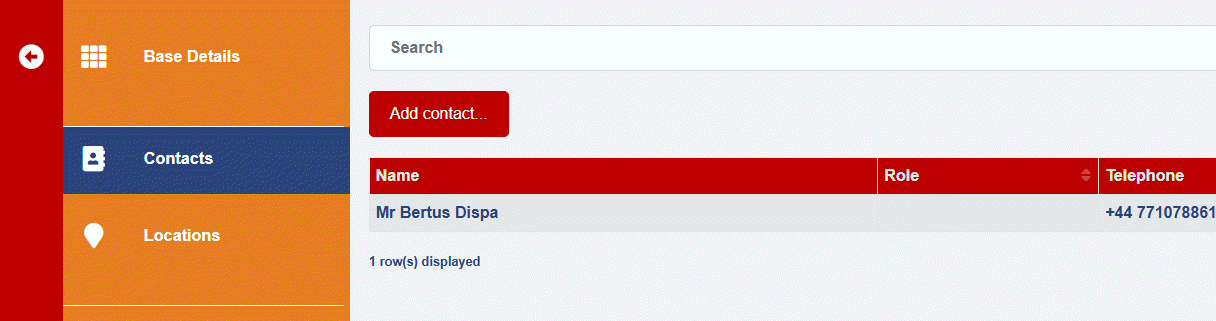
The anchor feature allow you to link audit entries not only to the entity / pk combination the audit entry is for but also to another entity. When used, the other entity is often the parent entity that owns the dossier this entity is part of.
The following shows an audit type definition which makes use of the anchor feature:
    audits: <
        insert: <@bo/audit
            summary: $resolveTemplate( 'Contact created ({{ bo.attr( [_me], "name") }})' )
            anchorEntity: 'account/account'
            anchorPK: $bo.attr( [_me], 'account' )
        >
Note the use of the $-syntax!
Primary Audit Entries
You can imagine that over time many audit entries are written over time and that some entries are more important than others. You can mark audit entries as primary (default) or secondary (or rather primary: false()). This serves no other purposes than to allow you to quickly filter important entries from less important ones when viewing the audit history (see next paragraph)
Viewing Audit Entries
There is a qualifier that you can use to add an auditing view facility to a case / dossier. The following shows this in action:
function audits()
    set('content', page.get('./audits'))
    page.render( page.get('../main') )
end-function

resource audits
    <@page/container
        content: <@page/audits
            entity: 'account/account'
            pk: qs.get( 'account' )
        >
    >
end-resource
Simply pass the entity and pk and Bob's your uncle. This qualifier will show all audit entries for the given entity, pk as well as where the anchor entity and anchor pk match.
Tags Related to Auditing
There are two tags that can be set on a BO descriptor (see <@bo/enhancers> or use the boDesc.setTag() function):
| Enhancer | Usage |
|---|---|
| noAudits | States whether or not audits should be written |
| noTouch | States whether or not audit attributes should be set |
The following is an example where we use noAudits to make sure we do not write audit entries even through the bo.writeAudit() function is called.
    bo.setAttr( [visit], 'extraDeliveryNotes', bo.attr( [_me], '_extraDeliveryNotes') )
    boDesc.setEnhancer( [visit], 'noAudits', true() )
    bo.persist( [visit] )
Thoughts on Auditing and Security & Privacy (!Pitfall)
Beware of situations where you have taken a lot of care in making sure certain users do not see certain attribute values. These users with restricted access may have access to the audit trail where they may see the value of these sensitive attributes!
Options:
- Do not include sensitive attributes in the audit type audit group
- Do not give access to the audit tab to all users
- Do something clever in the
_eventActionposteventActionType.RS2BOand clear the value of sensitive attributes for certain users
A Generic Touch Function (!Tip)
The following is a script hat can be used to touch the audit attributes of BO's:
function touchBO( bo, when:now(), user:user() )

    set('ts', format( [when], 'dd-MMM-yyyy hh:mm:ss') )

    set(
        'sql',
        formatString(
            `update {0} set cmCreatedBy='{1}', cmUpdatedBy='{2}', cmCreatedWhen='{3}', cmUpdatedWhen='{4}' where {5}={6}`,
            bodesc.getTable( [bo] ),
            [user], [user],
            [ts], [ts],
            bodesc.getAttrColumn( [bo], bodesc.getPK( [bo] ) ),
            bo.pk( [bo] )
        )
    )

    sql.execute( [sql] )

end-function
<End of document>