Qualifiers and Property Bags in Detail
We have seen property bags and qualifiers in action in various examples. Property bags are to CaseMaster what JSON is to Javascript.
In this chapter we will look a property bags and qualifiers (a special type of property bag) in more detail.
The Anatomy of a Property Bag
The simplest property bag is the empty property bag and is created as follows:
set( 'emptyPB', <> )
A property consists of zero of more entries where an entry may have a name. The following shows a property bag with 3 entries of which 2 are named and one is not.
    set(
        'PB',
        <
            entry1: 'Hello gr'
            entry2: 8
            'world'
        >
    )
The 3 entries all exist at 'level 1'. If an entry has a name, the name must be unique at its level. Take the following example:
Note: the function pb.count() returns the number of entries at level 1 of a property bag.
    set(
        'PB',
        <
            entry1: 'Hello gr'
            entry2: 8
            'world'
        >
    )

    response.write( pb.count( [PB] ) )
    // Writes 3

    response.write( '<br>' )

    set(
        'PB',
        <
            entry1: 'Hello gr'
            entry1: 8
            'world'
        >
    )

    response.write( pb.count( [PB] ) )
    // Writes 2
A property bag entry can be another property bag and thus create another level:
    set(
        'PB',
        <
            <
                id: 12
                name: 'Joe Smith'
                dob: #5 mar 1972#
            >
            <
                id: 18
                name: 'Mary Jane'
                dob: #12 June 1992#
            >
        >
    )

    response.write( pb.count( [PB] ) )
    // Writes 2
Using Expressions in Property Bags
Each of the entries in the previous example is a literal value (such as 12, 'Joe Smith' or the date #12 June 1992#). Literals are the simplest of expressions. Entries can also be more complex expressions:
    set(
        'PB',
        <
            example: today()
        >
    )

    response.write( [PB] )
    // Writes date of today
Note the behaviour when you refer to a property bag as a string (as we do in the response.write() in the above example). CaseMaster will simply return the string value of the first entry.
$-Expressions
We have already seen $-expressions in action for the dynamic value and default value of an attribute (see here).
Expressions in a property bag are resolved when the property bag is first used. For performance, expressions are cached when they are first evaluated and the cached value is used moving forward.
Using a $-expression instructs CaseMaster to not cache the value but re-evaluate the expression on every use. This is demonstrated in the following example:
    set(
        'PB',
        <
            example: random()
        >
    )

    response.write( [PB] )
    response.write( '<br>' )
    response.write( [PB] )
    response.write( '<br>' )

    set(
        'PB',
        <
            example: $random()
        >
    )

    response.write( [PB] )
    response.write( '<br>' )
    response.write( [PB] )
    response.write( '<br>' )

    // Possible output:
    // 0.248785048373409
    // 0.248785048373409  (the same, without the $)
    // 0.700962220179365
    // 0.0291897929409471 (different because of the $)
Getting Stuff from Property Bags
The function pb.get() is used to retrieve entries from a property bag. The function takes two parameters: a property bag and a path.
    set(
        'PB',
        <
            <
                id: 12
                name: 'Joe Smith'
                dob: #5 mar 1972#
            >
            <
                id: 18
                name: 'Mary Jane'
                dob: #12 June 1992#
            >
        >
    )

    response.write( pb.get( [PB], '1/id' ) )            // 1
    response.write( '<br>' )
    response.write( pb.get( [PB], '2/id' ) )            // 2
    response.write( '<br>' )
    response.write( pb.get( [PB], '-1/name' ) )         // 3
    response.write( '<br>' )
    response.write( pb.get( [PB], '-2/dob' ) )          // 4
    response.write( '<br>' )
    response.write( pb.get( [PB], '1' ) )               // 5
    // Output
    // 12
    // 18
    // Mary Jane
    // 1972-03-05
    // 12
- Get the id from the first entry
- Get the id of the second entry
- Get the name of the last entry
- Get the dob of the sceond last entry
- Get entry 1 (which is a property bag and is treated as a string and thus return the first entry being 12)
Putting Stuff in Property Bags
The opposite of pb.get() is, obviously, pb.set().
The following results in the same property bag as in the previous example:
    set(
        'joe',
        <
            id: 12
            name: 'Joe Smith'
            dob: #5 mar 1972#
        >
    )

    set(
        'mary',
        <
            id: 18
            name: 'Mary Jane'
            dob: #12 June 1992#
        >
    )

    set( 'PB', < > )

    pb.set( [PB], '1', [joe] )
    pb.set( [PB], '2', [mary] )
The pb.set() function takes 3 or 4 parameters but the version with 3 parameters is most commonly used.
| Parameter | Use |
|---|---|
| Property bag | Handle to a property bag |
| Path | Valid path |
| Value | Value to set entry to |
The following example shows how to set values at sub-levels:
    set(
        'joe',
        <
            id: 12
            name: 'Joe Smith'
            dob: #5 mar 1972#
        >
    )

    set(
        'mary',
        <
            id: 18
            name: 'Mary Jane'
            dob: #12 June 1992#
        >
    )

    set( 'PB', < > )

    pb.set( [PB], '1', [joe] )
    pb.set( [PB], '2', [mary] )

    pb.set( [PB], '2/name', 'Joe Bloggs' )
    pb.set( [PB], '1/dob', #5 dec 2000# )

    response.write( pb.get( [PB], '1/id' ) )
    response.write( '<br>' )
    response.write( pb.get( [PB], '2/id' ) )
    response.write( '<br>' )
    response.write( pb.get( [PB], '-1/name' ) )
    response.write( '<br>' )
    response.write( pb.get( [PB], '-2/dob' ) )
    response.write( '<br>' )
    response.write( pb.get( [PB], '1' ) )
    // Output
    // 12
    // 18
    // Joe Bloggs
    // 2000-12-05
    // 12
Property Bags as Arrays and Matrices
Property bags can be used as arrays. When you add entries to the same level without a name, you effectively create an array.
    set(
        'joe',
        <
            id: 12
            name: 'Joe Smith'
            dob: #5 mar 1972#
        >
    )

    set(
        'mary',
        <
            id: 18
            name: 'Mary Jane'
            dob: #12 June 1992#
        >
    )

    set( 'PB', < > )

    pb.set( [PB], null(), [joe] )
    pb.set( [PB], null(), [mary] )

    response.write( pb.count( [PB] ) )
    response.write( '<br>' )
    // Output
    // 2
Needless to say that you can create matrices by nesting property bag arrays inside property bags.
Iterator.ofPB()
The iterator.ofPB() function enables yo you iterate over the entries in a property bag.
    set(
        'PB',
        <
            <
                id: 12
                name: 'Joe Smith'
                dob: #5 mar 1972#
            >
            <
                id: 18
                name: 'Mary Jane'
                dob: #12 June 1992#
            >
        >
    )

    iterate iterator.ofPB( [PB], 'item' )

        iterate iterator.ofPB( [item], 'entry' )
            response.write( [entry] )
            response.write( '<br>' )
        end-iterate

    end-iterate

    // Output
    // 12
    // Joe Smith
    // 1972-03-05
    // 18
    // Mary Jane
    // 1992-06-12
You can actually access the key of each entry if you make sure you have a handle to the iterator:
    set(
        'PB',
        <
            <
                id: 12
                name: 'Joe Smith'
                dob: #5 mar 1972#
            >
            <
                id: 18
                name: 'Mary Jane'
                dob: #12 June 1992#
            >
        >
    )

    iterate iterator.ofPB( [PB], 'item' )

        set( 'iterator', iterator.ofPB( [item], 'entry' ) )
        iterate [iterator]
            response.write( concat( iterator.key( [iterator] ), ' = ', [entry] ) )
            response.write( '<br>' )
        end-iterate

    end-iterate

    // Output
    // 12
    // Joe Smith
    // 1972-03-05
    // 18
    // Mary Jane
    // 1992-06-12
Property Bag and JSON
The function json.pb2json() can be used to turn a property bag into JSON.
    set(
        'PB',
        <
            <
                id: 12
                name: 'Joe Smith'
                dob: #5 mar 1972#
            >
            <
                id: 18
                name: 'Mary Jane'
                dob: #12 June 1992#
            >
        >
    )

    response.write( page.htmlEncode( json.pb2json( [PB] ) ) )
    // Output:
    // {
    //     "9c6b7036-ca72-4fcd-a79c-fffb5f68a25c": {
    //         "id": 12,
    //         "name": "Joe Smith",
    //         "dob": "1972/03/05"
    //     },
    //     "ea7cce41-cedd-4c2a-86e2-2104d5f80f3a": {
    //         "id": 18,
    //         "name": "Mary Jane",
    //         "dob": "1992/06/12"
    //     }
    // }
Note the GUID's that CaseMaster had to add to ensure the JSON is valid.
The solution is to use <@json/array> and make sure the array is not the outer level of the property bag:
    set(
        'PB',
        <
            array: <@json/array
                <
                    id: 12
                    name: 'Joe Smith'
                    dob: #5 mar 1972#
                >
                <
                    id: 18
                    name: 'Mary Jane'
                    dob: #12 June 1992#
                >
            >
        >
    )

    response.write( page.htmlEncode( json.pb2json( [PB] ) ) )
    // Output:
    // {
    //     "array": [
    //         { "id": 12, "name": "Joe Smith", "dob": "1972/03/05" },
    //         { "id": 18, "name": "Mary Jane", "dob": "1992/06/12" }
    //     ]
    // }
You can also turn JSON into a property bag:
    set(
        'PB',
        <@json
            array: <@json/array
                <
                    id: 12
                    name: 'Joe Smith'
                    dob: #5 mar 1972#
                >
                <
                    id: 18
                    name: 'Mary Jane'
                    dob: #12 June 1992#
                >
            >
        >
    )

    response.write( page.htmlEncode( pb.dump( json.json2pb( json.pb2json( [PB] ) ) ) ) )
    // Output:
    // <@json
    //     array: <@json/array
    //         <@json id: 12, name: "Joe Smith", dob: "1972/03/05">,
    //         <@json id: 18, name: "Mary Jane", dob: "1992/06/12">
    //     >
    // >
Advanced Property Bag Functions
| Function | Usage |
|---|---|
pb.parse() |
Parse a string that represents a property bag and turn it into a property bag |
pb.dump() |
Dump a property bag to a string |
pb.first() |
Get the first entry of a property bag; optionally the first to match a lambda expression |
pb.last() |
Get the last entry of a property bag; optional lambda expression |
pb.getRandom() |
Get a random entry of a property bag; optional lambda expression |
pb.filter() |
Create a new property bag filtered by a lambda expression |
pb.sort() |
Create a new property bag ordered by a lambda expression |
The following example shows pb.filter() in action:
    set(
        'PB',
        <
            <
                id: 12
                name: 'Joe Smith'
                dob: #5 mar 1972#
            >
            <
                id: 18
                name: 'Mary Jane'
                dob: #12 June 1992#
            >
        >
    )

    response.write( pb.filter( [PB], lambda.create( function ( a ) return match( pb.get( [a], 'name' ), 'Mary' )  end-function ) ) )
    // Output:
    // 18
The following example shows pb.sort() in action:
    set(
        'PB',
        <
            <
                id: 18
                name: 'Mary Jane'
                dob: #12 June 1992#
            >
            <
                id: 7
                name: 'John Smith'
                dob: #21 May 1987#
            >
            <
                id: 12
                name: 'Joe Smith'
                dob: #5 mar 1972#
            >
        >
    )

    response.write(
        page.htmlEncode(
            pb.dump(
                pb.sort(
                    [PB],
                    lambda.create(
                        function ( a, b )
                            return sub(
                                pb.get( [a], 'id' ),
                                pb.get( [b], 'id' )
                            )
                        end-function
                    )
                )
            )
        )
    )
    // Output:
    // <<id: 7, name: "John Smith", dob: #1987-05-21#>, <id: 12, name: "Joe Smith", dob: #1972-03-05#>, <id: 18, name: "Mary Jane", dob: #1992-06-12#>>
Qualifiers
We have already seen qualifiers in action. Take for example a look at the following attribute definition from a BO descriptor:
    email: <@bo/attribute/email
        label: <@mltext 'Email'>
        column: 'email'
    >
The @-sign indicates that we are dealing with a qualifier. A qualifier is a special type of property bag or property bag entry.
In the above example the type of the qualifier is @bo/attribute/email, this means that the system has access to a file bo/attribute/email.cms in the qualifier folder. This file is the implementation of the qualifier.
Qualifiers are very powerful yet rather abstract and thus difficult to explain.
One obvious, and easily explained, benefit of a qualifier is that the VSCode Casemaster® extension can provide code suggestions.
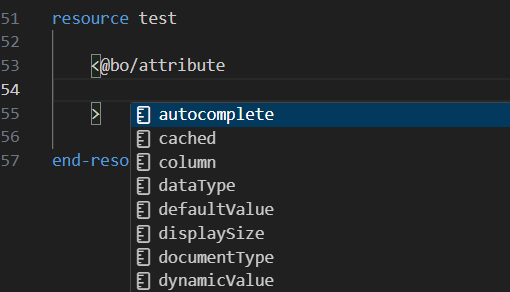
It can do so because a qualifier .cms may contain a schema resource describing the tags this qualifier property bag expects.
The following is an example of a schema resource:
    resource schema
        <@qualifier/schema
            summary: 'Defines a multi language text value',
            items: <
                text: <@qualifier/schema/item
                    name: 'text',
                    summary: 'Default language text value',
                >,
                key: <@qualifier/schema/item
                    name: 'key',
                    summary: 'Key for translations file',
                >,
                parms: <@qualifier/schema/item
                    name: 'parms',
                    summary: 'Parameters for formatting string'
                >
                language: <@qualifier/schema/item
                    name: 'language',
                    summary: 'Force language; otherwise use user language'
                >
                layer: <@qualifier/schema/item
                    name: 'layer'
                    summary: 'Specify a specific layer if not the main system'
                >
                strict: <@qualifier/schema/item
                    name: 'strict',
                    summary: 'Save text strictly as provided, case sensitive and otehr characters'
                >
            >
        >
    end-resource
A schema has 4 optional sections:
| Section | Use |
|---|---|
| summary | A brief summary of the purpose of the qualifier, shown by VSCode as hint |
| documentation | A more verbose explanation of the qualifier, shown in online help |
| insertText | Text that is inserted in a document when selecting code completion in VSCode |
| items | The accepted tags in the qualifier |
The most important section is the items section which is (as seen in the previous example) a collection of @qualifier/schema/item qualifier tag.
| Tag | Use |
|---|---|
| name | The name of the tag (mandatory) |
| summary | Summary, used by VSCode to show as hint |
| documentation | More verbose documentation, used by online help |
| defaultValue | Default value when the tag is omitted |
| qualifier | Name of qualifier if the tag itself is a qualifier (defaults to no qualifier) |
| mandatory | Indicates whether this tag is mandatory or optional (defaults to optional) |
The following is an example:
    <@qualifier/schema/item
        name: 'label'
        summary: 'Defines the attributes label'
        documentation: 'The label of an attribute either as a simple string, @text or @mlText'
        defaultValue: qualifier.call('./defaultValue', 'label')
        qualifier: '@text'
        mandatory: true()
    >
Qualifier inheritance
A qualifier can inherit from another qualifier. A common use of this feature is to override / set certain default values. Take for example the qualifier bo/attribute/boolean which inherits from bo/attribute.
inherits '@bo/attribute'

resource schema
    <@qualifier/schema
        summary: 'Defines a business object boolean attribute',
        items: qualifier.get('../schema', 'items')
    >
end-resource

resource defaultValues
    <
        dataType: dataType.Boolean,
        defaultValue: false(),
        length: 1,
        optional: false(),
        outputMask: 'Yes/No',
        displaySize: <@bo/attribute/property/displaySize/md>
    >
end-resource
The scheme simply gets the items from the schema from its parent (using the ../ syntax) and provides a number of meaningful default values for certain tags.
Qualifier Default Values
The defaultValues trick as shown in the bo/attribute/boolean example is just making clever use of CaseMaster® 2.0 features but proofs to be a very useful trick in qualifiers especially where you expect sub-classes.
The following entry in the schema/items section of bo/attribute shows it in action:
    <@qualifier/schema/item
        name: 'multiline',
        summary: 'Defines if the attribute is multiline',
        defaultValue: qualifier.call('./defaultValue', 'multiline')
    >
This trick relies on the following function and resource to be present in the qualifier:
function defaultValue(name)

    if qualifier.tryGet('./defaultValues', [name], 'value')
        return [value]
    else-if qualifier.tryGet('@bo/attribute:defaultValues', [name], 'value')
        return [value]
    end-if

    return null()

end-function

resource defaultValues
    <
        label: null()
        column: null()
        virtualColumn: false()
        dataType: null()
        foreignKey: null()
        foreignKeyLabelGroup: 'label'
        defaultValue: null()
    >
end-resource
Review the bo/attribute/boolean example again:
bo/attribute/booleaninherits frombo/attributeand inherits the schema itemsbo/attribute/booleanhas its owndefaultValuesresource- The function
defaultValuefirst checks the localdefaultValuesresource and, when nothing is found, gets the default value from the parent
\