Pages - Lists
(note: list is the CaseMaster® term form the Bootstrap table)
Lists make up a fair part of all online systems. CaseMaster® offers a number of main variations:
- List. A simple list with columns, you can optionally click on a row
- Filtered list. A list with a quick search option
- Extended filtered list. A filtered list with extended search options
- Check list. A simple list allowing you to select one or more items and action them
- Check filtered list. A filtered list allowing you to select one or more items and action them
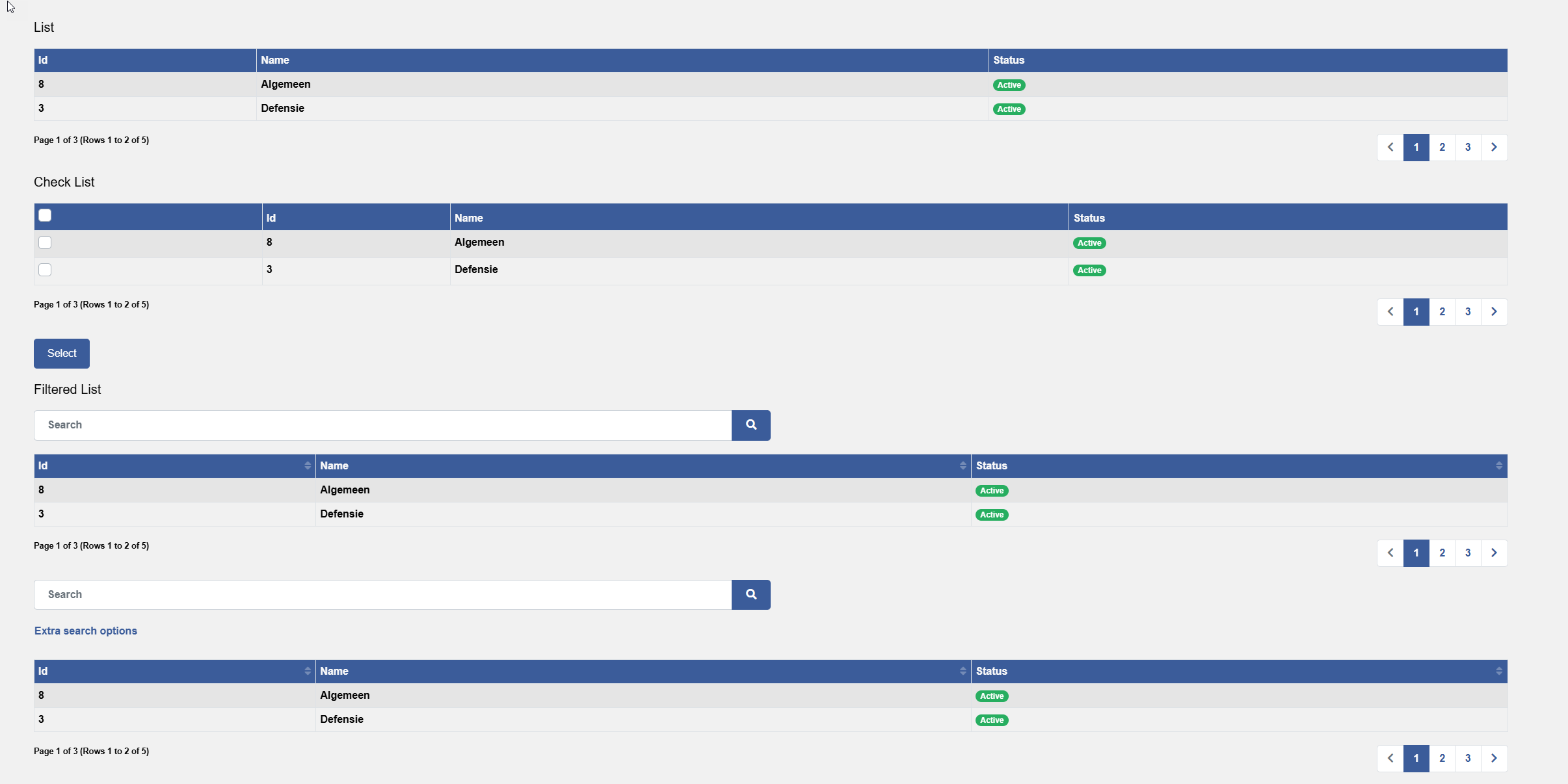
The following code shows the simple list <@page/data/table> qualifier, note the iterator.ofEntity() at the heart of the code, look here for more information.
inherits 'base'

function main()
    page.render(page.get('./main'))
end-function

resource main
    <@page/container
        content: <@page/content
            <@page/data/table
                iterator: iterator.ofEntity(
                    entities: <
                        <
                            name: 'contract'
                            entity: 'prm/contract'
                            orderby: 'name'
                        >
                    >,
                    rows: 2
                )
                group: 'id,name,_status'
            >
        >
    >
end-resource
The <@page/data/table> has a number of tags which are shared by all list variations. The most important tags are:
| Tags | Usage |
|---|---|
| tableClass | Specifies one or more class names for the table |
| includeHeader | Will a header row be included |
| headClass | Specifies one or more class names for the table head |
| rowClass | Specifies one or more class names for the rows |
| rowExclude | A Boolean flag to state if a row should be exclude |
| rowLink | Specifies a link for a row |
| responsive | Force responsive table (see Bootstrap documentation) |
| compact | Force compact table (see Bootstrap documentation) |
| bordered | Force nordered table (see Bootstrap documentation) |
| striped | Force striped table (see Bootstrap documentation) |
| rightAlignNumbers | Enable right-aligned numerical values (defaults to true()) |
| iterator | The iterator containing the data to be listed |
| group | Defines the tables display group |
| sortable | Enable sorting of the table columns |
| export | Enable exporting of the table |
| pagingMode | Specify what sort of paging mode you want |
Group
The group tag defines which columns are displayed. The simplest version would be something like this:
group: 'description'
If the iterator has multiple entities, the list will show the description group for each of the entities.
You can optionally prefix each entry in the ad-hoc group with the name of the entity:
group: 'client:description'
The following is an extended example:
    <@page/data/table
        iterator: iterator.ofEntity(
            entities: <
                <
                    name: 'object'
                    entity: 'om/object'
                    orderBy: 'reference'
                >
                <
                    name: 'location'
                    entity: 'crm/location'
                    orderBy: 'postcode'
                >
            >
        )
        group: 'location:_address,object:description,-object:status'
    >
RowLink
The rowlink tag defines what happens when a user clicks on a table row. The following is a commonm example:
    rowLink: <@page/table/link
        url: <@url
            address: 'activityStart'
            qs: <
                activity: $bo.pk( [activity] )
            >
        >
    >
Note that the activity tag uses a $-expression (as we have seen with BO dynamic attributes). This makes sense as the expression refers to the entity of the iterator and this is only available at runtime, not when the property bag is retrieved.
The following example is from a system that makes use of the base layer:
    rowLink: <@page/table/link
        url: <@url
            address: 'objectAddSelectObjectGroup'
            qs: <
                relation: $bo.pk( [relation] )
            >
        >
    >
Export
The export tag is used to define whether and how the table data can be exported. The simplest format is as follows:
export: true()
Or you can allow / disallow exporting based on the users' group:
export: inGroup( 'ADMIN')
The export tag can however have a lot more information:
export: inGroup( 'ADMIN')
The following shows an extended example:
    export: <@page/data/table/export
        iterator: $bo.invoke(
            'application/data/bo',
            'list',
            name: 'entity',
            page: 1,
            limit: 9999,
            filter: qs.getUntrusted('filter'),
            attrs: true()
        )
        group: '*'
    >
See the @page/data/table/export for details.
Paging Modes
The standard paging-mode for a table is full (unless you make use of the rowExlude option in which case the system falls back to the lookAhead mode). The options are:
| Option | Usage |
|---|---|
| Full | (Default) show current page, total number of pages, total number of rows; ability to go to previous- next page and several pages by number |
| Basic | Only allow going to previous- and next page |
| None | No paging features |
| LookAhead | Allow going to previous- and next page and various previous page and one next page by number |
The paging mode full requires the system to count the number of rows and will thus result in an extra query. Use basic or lookAhead if this takes up too many database resources.
    // More table stuff here
    pagingMode: pagingMode.basic
    export: true()
    // More table stuff here
Using RowExclude
You can use the rowExclude option to exclude rows based on an expression. This can be useful for advanced scenarios where you cannot exclude rows through the where clause of the iterator.
The following example excludes all rows that do not have a digit in the name:
    // More table stuff here
    rowExclude: $not( match( bo.attr( [relation], 'name' ), '[0-9]' ) )
    // More table stuff here
Note that rowExclude must be a $-expression.
Using RowClass
The rowClass tag can be used to assign a specific class to a row; often based on specific values.
The following example demonstrates how a row will have the text-muted class added when the status equals 3. Notice the $-expression.
rowClass: $if( eq( bo.attr( [login], 'status' ), 3 ), 'text-muted', null() )
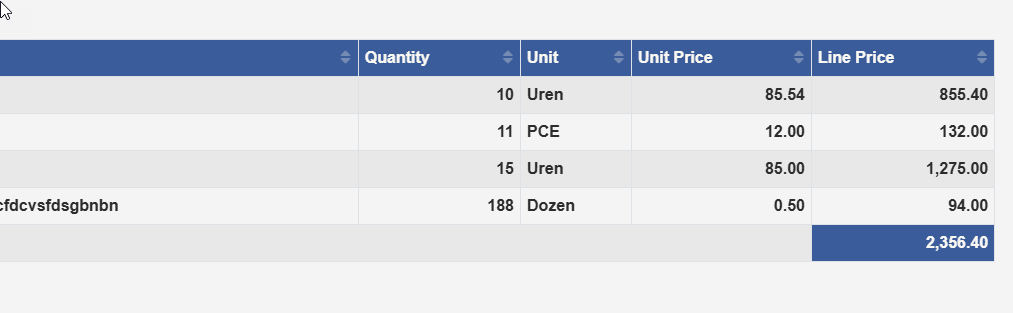
Totallers
Totallers are part of the base-layer and are used to add totals to specific table columns.
    totallers: <
        <@page/data/table/totaller
            attribute: 'linePrice'
        >
    >
See the qualifier @page/data/table/totaller for more information.
Sticky Headers
You can create 'sticky headers' (where the header always is visible and cannot be scrolled out of view)
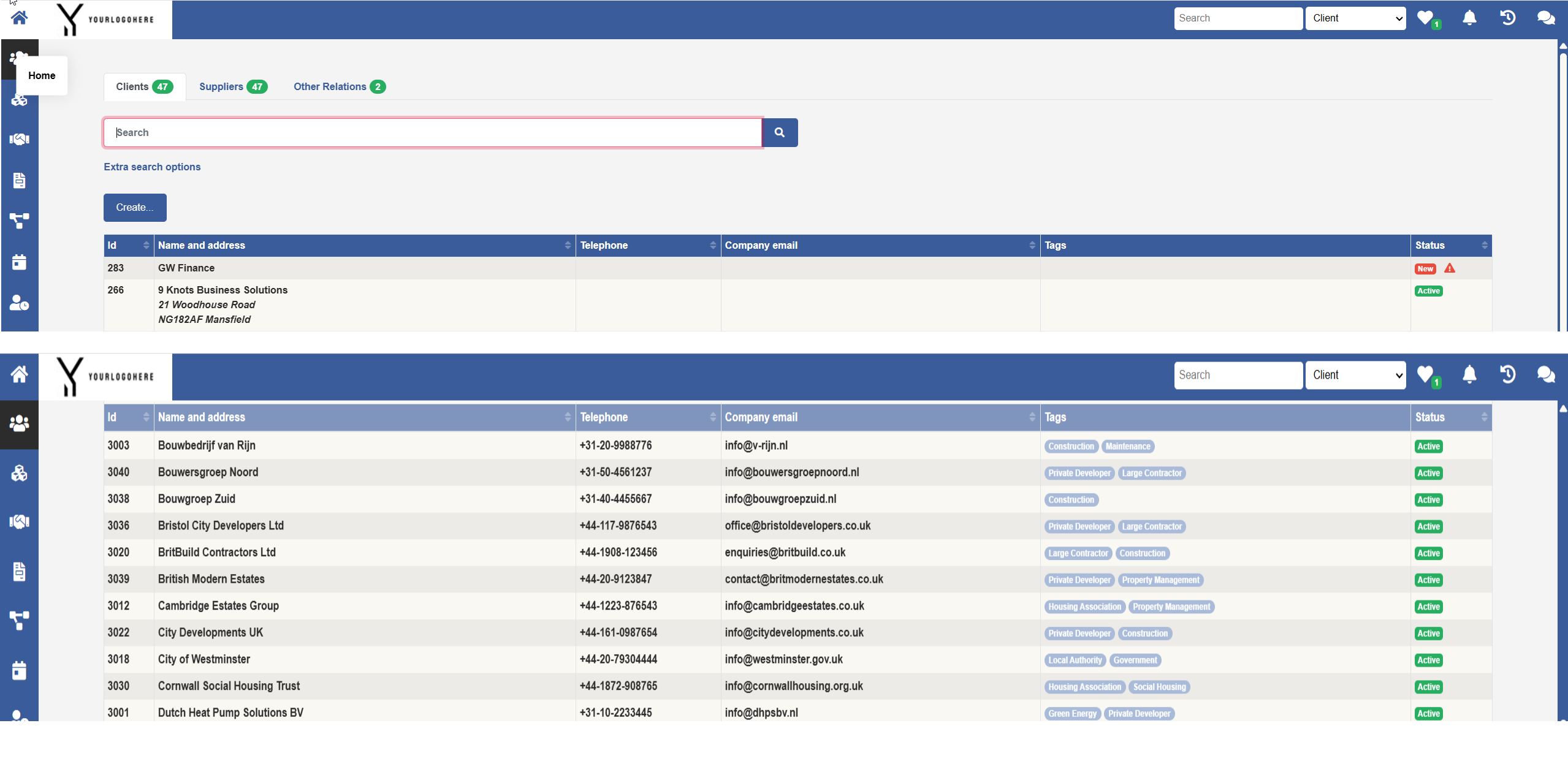
Simply add the class sticky-top to the classes for the table header:
    // More table stuff here
    headClass: 'bg-primary text-light sticky-top'
    group: 'type.description'
    rowLink: <@page/table/ilnk
    // More table stuff here
Filtered Lists
The filtered list is probably the most common list in any CaseMaster® application.

The filtered list is an extension to the basic table and adds a filter to the top and, optional, buttons below the filter (Add currency... in the example).
function main()
    page.render( page.get( './main' ) )
end-function

resource main
    <@page/container
        content: <@page/content
            <@page/title label: <@mlText 'Currencies' > >
            <@page/data/table/qsearch   // @page/data/table/qsearch instead of @page/data/table
                iterator: iterator.ofEntity(
                    entities: <
                        <
                            name: 'currency'
                            entity: 'rd/currency'
                            orderby: 'id'
                        >
                    >,
                    rows: 100
                ),
                group: 'description'
                rowLink: <@page/table/link
                    url: <@url
                        address: 'edit'
                        qs: <
                            pk: $bo.pk( [currency] )
                        >
                    >
                >
                content: <@page/content
                    // This is where the button(s) below the filter are defined
                    <@page/button/new
                        label: <@mlText 'Add currency...'>
                        url: 'create'
                    >
                >
            >
        >
    >
end-resource
There are a number of important additional tags that qsearch offers over the standard table:
| Tag | Usage |
|---|---|
| hold | Do not show the list until the user has done the first search |
| searchGroup | Specify the attribute group to include in the quick search (default is search ) |
| persist | Save the filter value (and page and sorting) when user moves to another page |
| placeholder | Hint inside the filter box |
Extended Filtered Lists
The extended filtered list can be used to add additional search options to the quick search.

The following code example shows the extended search in action (the code example is simplified for clarity):
Note how the developer has to translate the extended filter fields into the relevant where clause.
function main()
    // Create filter
    set( 'filter', boDesc.create( 'contact' ) )
    boDesc.setAttrLocked( [filter], '*', false() )
    boDesc.setAttrIsOptional( [filter], '*', true() )
    boDesc.setTable( [filter], null() )
    boDesc.setEnhancer( [filter], 'noAudits', true() )

    // Add additional attributes to filter
    boDesc.addAttr(
        [filter],
        '_addressFilter',
        <@bo/attribute
            label: <@mlText 'Address'>
            dataType: dataType.String
            length: 100
        >
    )

    // Render the page
    page.render(page.get('./main'))
end-function

resource main
    <@page/container
        content: <@page/content
            <@page/data/table/qsearch/extended
                filter: <@page/data/table/qsearch/extended/filter
                    name: '//filter'
                    entity: [filter]
                    groups: 'company, _addressFilter'
                >
                iterator: iterator.ofEntity(
                    <
                        <@iterator/entity
                            name: 'contact'
                            entity: 'contact'
                            where: $buildString(
                                '&',
                                if( isNotNull( bo.attr( [//filter], 'company' ) ), 'company={ bo.attr( [//filter ], "company" ) }', null() ),
                                if( isNotNull( bo.attr( [//filter], '_addressFilter' ) ), '#exists[ company/address, #qsearch( search, { bo.attr( [//filter], "_addressFilter" ) } ) ]', null() )
                            )
                        >
                    >
                )
                group: 'description'
                content: <@page/content
                    // Stuff here to show buttons
                >
                rowLink: <@page/table/link
                    // Stuff here to handle row-click
                    >
                >
            >
        >
    >
end-resource
Check Lists
<End of document>