May 2025 (version 2.25.05.30)
reviewed: 7 October 2025
Tooling
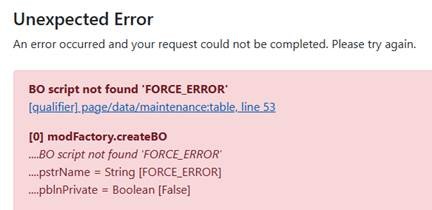
- Improved 500 error message screen when using the “vscode” layer
- The top error message location is now clickable and will open the corresponding location directly in VSCode
New Features
- Added word handler functions for inserting page breaks
word.insertBreakBefore( [range] )word.insertBreakAfter( [range] )
- Added
spreadsheet.clear()function to allow clearing the content of a range of cells- This clears not only the cell values but also the formatting and styling
spreadsheet.clear( [document], [range] )
- Added
env( [key] )to allow access to environment variables- This allows settings to be passed in externally, either directly or through the
configuration.cms - For example, this can be used to provide secrets securely, avoiding plain text storage in the
configuration.cms - Environment variables can be configured through tooling, IIS, or other hosting environments
- This allows settings to be passed in externally, either directly or through the
Enhancements
<@page/button/dropdown>is now auto excluded if no content or link is provided- This applies both when exclusion is explicit and when all dropdown links have been dynamically excluded
<@oauth>now allows overriding the redirect URL- The default is
lcase( request.urlBase() )
- The default is
Fixes
spreadsheet.setValue()was incorrectly clearing formatting and styling when setting the value tonull()